Workflow Autocomplete Box not showing up in right place

I have a workflow with an autocomplete box that uses another layer. It looked like no results were returning but in every alert I put in the correct address would come up. I finally opened it on a vertical monitor and can see the results are populating well below where they should. Any ideas on how to fix this? 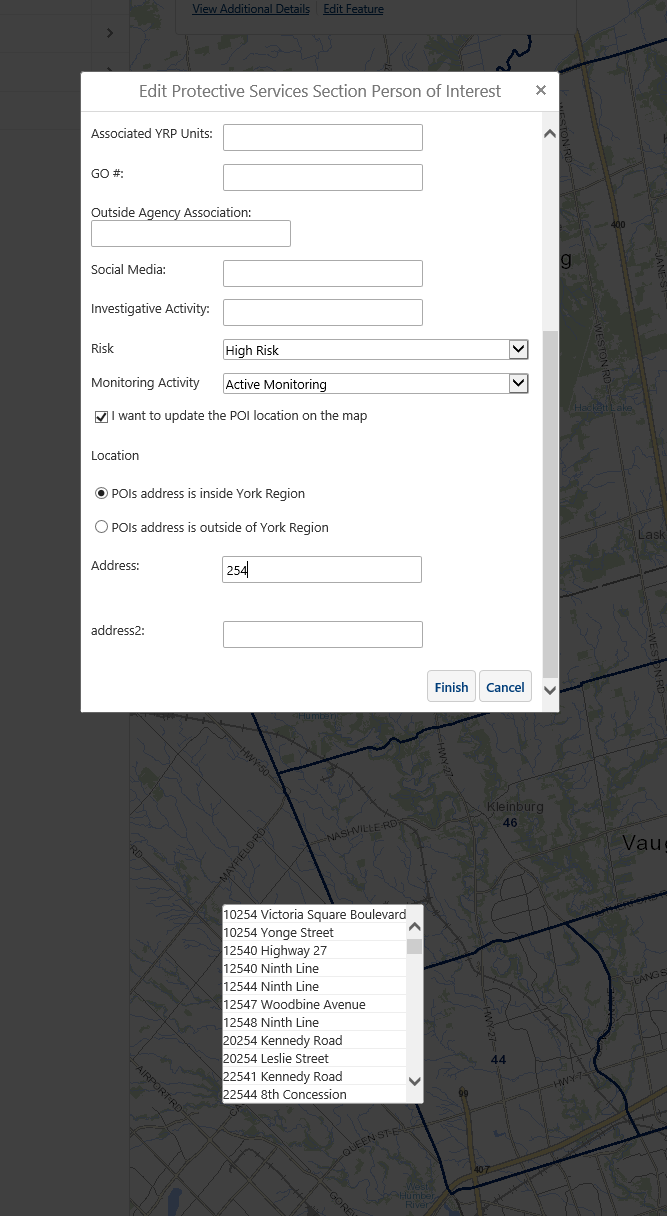
0
-
Hi Stephanie,
I am wondering if it is related to the autocompletes position on the form? If you move the field to the top (as a test) does it still behave the same way?
Regards,
Wayne Richard
Latitude Geographics Group Ltd.
Head Office: 300 – 1117 Wharf Street Victoria, BC Canada V8W 1T7
Tel: (250) 381-8130 | Fax: (250) 381-8132 | wrichard@latitudegeo.com
Developers of Geocortex web-based mapping software | www.geocortex.com
An Esri Platinum Business Partner0 -
Hi Wayne,
Looks like you're right. It's in Group 4 in the form, but when I move that to the top it works as expected. Is there a known solution for this? _img_ alt="User-added image" src="https://latitudegeo--c.na53.content.force.com/servlet/rtaImage?eid=907f2000000XeMs&feoid=Body&refid=0EMf2000000YDmP"_/_img_0 -
It looks like a bug. Can you please email me the workflow file and I will file it and post the bug number here?
Thanks,
Wayne Richard
Latitude Geographics Group Ltd.
Head Office: 300 – 1117 Wharf Street Victoria, BC Canada V8W 1T7
Tel: (250) 381-8130 | Fax: (250) 381-8132 | wrichard@latitudegeo.com
Developers of Geocortex web-based mapping software | www.geocortex.com
An Esri Platinum Business Partner0 -
Thanks Stephanie, I have filed this issue as "BUG 25457".
Regards,
Wayne0
Please sign in to leave a comment.
Comments
4 comments