How can I make the time slider visible only when the time aware layer is turned on?

In my viewer I have an Archived Signage layer loaded as a feature service. It is turned off when the site is first loaded, yet the Time Slider appears anyway. I would like for the Time Slider to appear only when the Archived Signage layer is turned on. As the site stands, Archived Signage is in a layer list group together with the active Highways Signage feature layer, with the group set for Sub-item Visibility | Only One Visible at a Time. What event could I set up a listener to pick up to activate the Time Slider when the Archived Signage layer gets turned on? Is this even possible?
Thanks,
Justin
0
-

You can set it to not be active by default (user has to turn it on), but I don't know of a setting for it to activate on layer toggle on. This is better than it being on all the time, but not as good as what you are asking for. 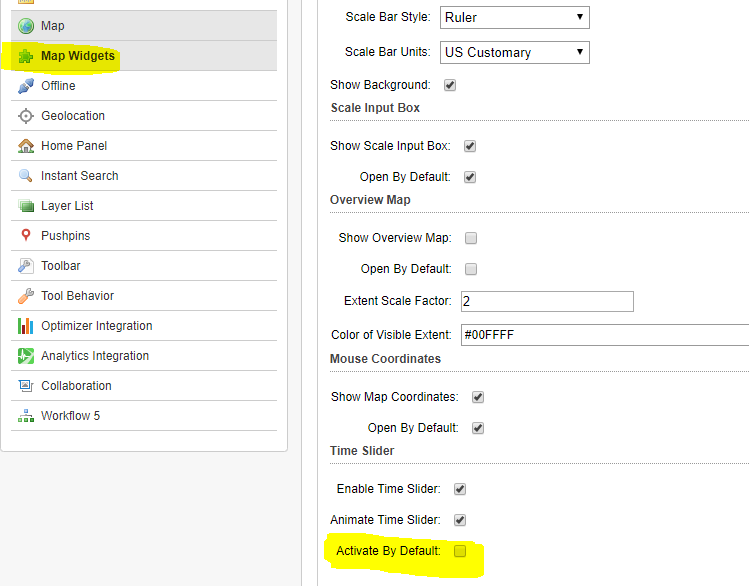 0
0 -
Yes, thanks, Jamie. I am aware of being able to set it to be inactive at first. I have it that way on the tablet config, but am hoping I can do same on the desktop config, too, because of its uselessness until the time-aware layer is turned on. What I am hoping for is that there is an event that fires when a layer is turned on. If so, I will set up a listener for the archive layer. I cannot find a list of GVH events that can be listened for. Can someone direct me to that, please?
Thanks,
Justin0 -
I found a solution.
I had already set up the time slider to toggle on and off from the toolbar toggle button, as I learned to do from the Amanda Frech reply in this post (https://support.geocortex.com/essentialsGSCForum?sub-nav=forum&main-nav=essentials&#!/feedtype=SINGLE_QUESTION_SEARCH_RESULT&id=90660000000CjulAAC) . But today I modified the toggle button to replace the command ActivateTimeSlider and the the command DeactivateTimeSlider with the command RunWorkflowById.
The command parameter for Toggle On that had been empty for ActivateTimeSlider is now the name of the workflow I created with two RunExternalCommand activities. First is SwitchToLayerTheme, with the "Archive" theme name as its parameter. I only just today made this theme, specifically for the purpose. Second is ActivateTimeSlider with no command parameter. To illustrate: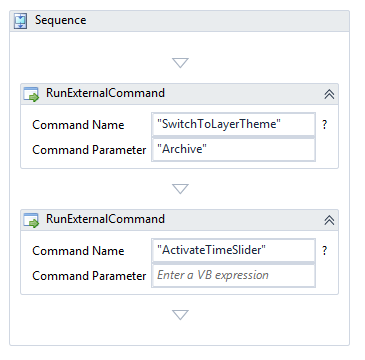
The command parameter for Toggle Off that had been empty for DeactivateTimeSlider is now the name of the second workflow I created with two RunExternalCommand activities. First is SwitchToLayerTheme, with the "All Available Layers" theme name as its parameter. Second is ActivateTimeSlider with no command parameter. To illustrate: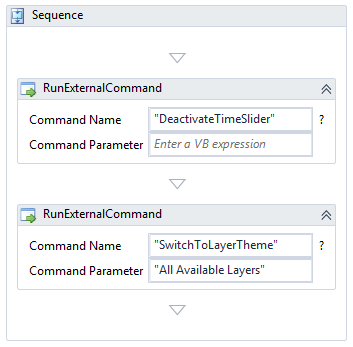
This works perfectly and I recommend it highly.
Cheers,
Justin0
Please sign in to leave a comment.
Comments
3 comments