Taking Geometry from user selected Parcels and passing it to an existing Feature Layer (Appending one layers geometry to anothers)

Hello,
I have a Workflow that does the following so far:
1) User uses geometry picker to select Parcels (selected parcels geometry will eventually get transferred to another feature class)?
2) The civic address of each selected parcel appears in a Text box, then the user has the ability to use a second geometry picker to add/remove parcels from their initial selection
What I need the workflow to do after is:
3) Take the geometry of the user selected parcels, DISSOLVE them into one large perimeter geometry, APPEND that geometry to a completely different feature layer (and ideally allow the user to set some attributes for the new geometry).
I am very new to Workflow 5, I have a model (Geoprocessing Service) like this basically working with Web App Builder; however, geoprocessing services output a result that cannot be edited rather then appending the results to the existing hosted feature layer.
Does Workflow have the ability to append geometry from one hosted feature layer to a completely different one ?
Thanks!
-
Hi Ryan,
There isn't a dissolve activity in Workflow 5 but you can get the equivalent using the Get FeatureSet Geometries activity. I created a workflow that approximates what I think you're after. The flow is:
- query a layer
- get the geometries and set the Union flag to true. This will merge all the geometries into one.
- Create a feature using the geometry.
- Update the new features attributes using a form.
I have some extra steps to add the new geometry to the map but they are only there to validate the union and can be removed.
The sample workflow can be found here:
https://latitudegeo.maps.arcgis.com/home/item.html?id=aaf9a505c1c0429aae6ce845912856eb
Colin
0 -
Colin,
Am I able to get the output of the first half of my current Workflow to be the input on the Query Layer (ex. the User selected parcels)??
0 -
Also, in my workflow I need to have the geometry from one hosted feature layer write to another one, not to be output to a new feature (if that makes sense).?
0 -
Hi Ryan,
Yes. You can use the user selected parcels as the input to the query. This can be done by either using shared attributes (e.g. PID, etc.) in the queries where clause or using the geometry of the selected parcels.
As for the using the geometry to add to a different feature layer, that is possible by setting the URL of the Add Features activity to the target feature layer.
Colin
?
0 -
Thanks Colin! I appreciate the help.
I am going to try and make the List box where the user inputs the attributes to populate with the existing feature layer's domain and symbology.?
0 -
@Colin Doak? ?,
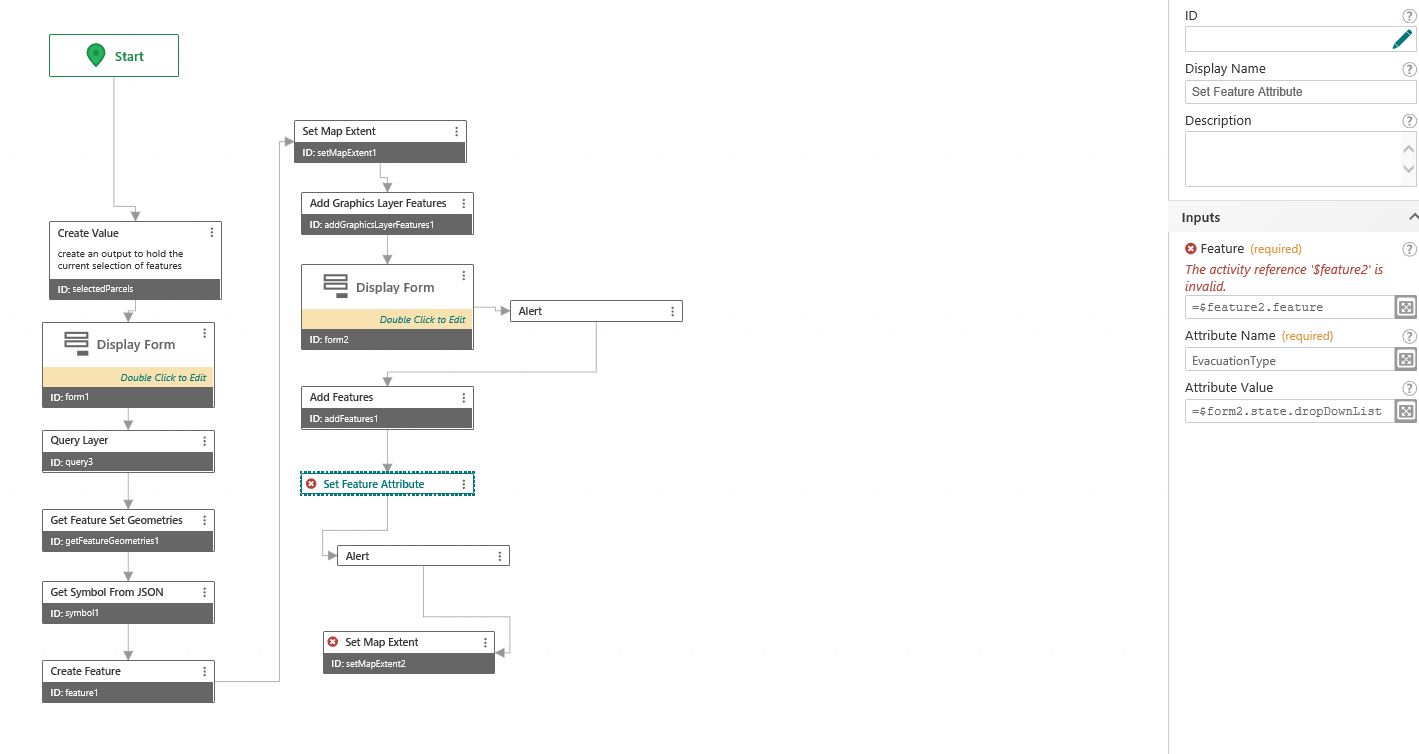
I am having issues with the Set Feature Attributes part of the Workflow. The Add Features successfully adds the user selected geometry to the existing hosted feature layer; however, I think I need a step in between the Add Features and the Set Feature Attributes as I cannot call the Hosted Feature Layer entered in the Add Features (see below).
The Set Attributes tool's Feature input currently is the output from Create Feature, which is a temporary geometry checker polygon.
Any thoughts?
0 -
 0
0 -
Hi Ryan,
The Set Feature Attributes activity will add or update the attributes of an existing feature that is already in the Workflow. You can get the feature 1 of 2 ways:
- Create a new feature through the Create Feature activity. You can then populate that feature with your attributes.
- Query ArcGIS Server to get the feature.
Once you've modified the feature, you can then use it to update or add to a feature layer via an ArcGIS feature service.
I'd need more details to be sure but the error in your screen capture suggests that $feature2 doesn't exist or is not a ArcGIS Feature.
Hope this helps.
Colin
0 -
@Colin Doak? ,
The error was just from me trying to add a second feature. I have a pre-existing feature I am trying to do this work too so do not want to create a new feature; therefor, option 1 wouldn't work (?)?. For option 2, if I add a query layer before the second display form (ex. query 4), can I then use =$query4.feature in the Set Feature Activity?
0 -
Yes, option 2 will work as you describe. You can test this in the workflow sandbox, I recommend opening your viewer console and watching the workflow run since I find it a useful way to 1) understand how the tool handles activities and 2) better understand the classes of the objects that you're working with, which will help you to write more elegant workflows.
I don't understand why you aren't using your preexisting feature here though, that seems to me the path of least resistance for you. Also, perhaps I missed something about the workflow, but why are you setting the attribute after you upload the feature to the service? If you're trying to upload a feature with an attribute change, why not upload once with all of the changes you want?
To your error: you can't initialize an object in a js expression as shown in the screenshot provided, and more importantly you can't initialize an object outside the confines of an activity in WF5. That is to say that if you want to create a new variable then you need to use an activity for it, such as "Create Value" or "Create Feature". Again, watching the console while developing will help you with this. The error that you got is because you never created an activity with id "feature2"; an activity with this id is what workflow designer looks for when the reference is called in an expression and, as you see in this case, the workflow can find no such activity.
0 -
The workflow is supposed to do the following:
1) user draws basic polygon overtop of desired Parcels (parcel layer hosted on AGOL)
2) that polygon? selects those Parcels and extracts their geometry (and unions their geometries)
3) This geometry is then appended to an Evacuations Layer (which is hosted on AGOL), creating a new Evacuation polygon
4) User then sets the evacuation level of this newly created polygon (etc. alert, order, rescind)
Does that clarify any of your above questions? The feature is uploaded to the service, then I set the attribute as the attribute lives in the service, not the feature. The feature is essentially just geometry.
0 -
The "Set Attribute" task modifies a feature. The feature is an esri js object that only exists in the memory of the client which is running the workflow, so changes made to a feature object in your workflow will not be reflected in a service unless you upload/update the service using the "add" or "update" features activities.
ESRI's AGOL databases aren't configured to take direct connections over the internet, so we need to make a web request to the hosted layer in order to apply edits.
0
Please sign in to leave a comment.
Comments
12 comments