Is it possible to remove CSS?

A search form makes a query that returns features, and for each feature, a for each loop adds a check box dynamically to a new display form. Depending on one of the feature attributes being true or false, I want the label of the checkbox to be red or black. The element ids of the added check boxes are id0, id1, id2, ...idn given from each pass of the loop, and corresponding CSS code is injected to make the label red or black. The injected CSS-code remains inside the viewer after the workflow has ended, and problem occurs when my search workflow is run the third time. Eg. the checkbox id0 is styled to be red the first time, and this CSS is overridden to make id0 black the second time. After that, it is not possible to make id0 red again, because it is not possible to override the CSS with the same code that has already been overridden in the viewer.
Is it somehow possible to remove the CSS that has been injected by the inject CSS activity?
-

Hi Jostein,
It isn't possible to remove or change the CSS that has been injected by the Inject CSS activity.
The pattern I'd suggest is to change the CSS you inject to use classes rather than ids. Then in your workflow when you are assigning items to your list you can set the "styleName" property on them.
With this pattern your CSS is defined once and sets up all the classes you'll need. Then your workflow decides which elements/items to apply those classes to.
I've attached a sample that does this.
--Ryan
0 -

Thanks Ryan, I used your suggestion for to dynamically colour my checkbox group, in which the number of checkbox changes dynamically. works great.
0 -

@... Hi Ryan,
I have a similar issue but for me I want to have the color set on a pop-up.
So I have a workflow that sets the color depending on the line you hover over, but once all three colors have been shown in the pop-up the last one remains.
So in my case it is not a single injection, how would you go about this in the case of hovering and displaying the color in the textbox/popup?Thanks
0 -
Hi Andreas Broothaerts,
I don't think we have enough to go on for your issue. The things we would have to look at are:
- What HTML elements get created in each popup?
- What HTML elements in that popup are you trying to style?
- What HTML “class” and “id” attributes exist on those elements that allow you to target them?
- What CSS are you adding in your workflow that targets those elements?
Assuming your popup had some predictable class names and looked roughly like this:
<div>
  <div class="row">Row 1</div>
  <div class="row">Row 2</div>
  <div class="row">Row 3</div>
<div>
I'd guess you'd want something like this:
.row:hover {
	background-color: cyan;
}
This is really a pure CSS problem, rather than Workflow one. The Inject CSS activity just adds a stylesheet to the page. It is your CSS-jujitsu that controls what happens. Personally I would mock up my HTML and CSS in a sandbox like this https://www.w3schools.com/cssref/tryit.php?filename=trycss_sel_hover and make sure it works first and then apply it to the popup.
0 -
Hi @...
- What HTML elements get created in each popup?
For the HTML, I'm targeting the '"gcx-forms-textBox1"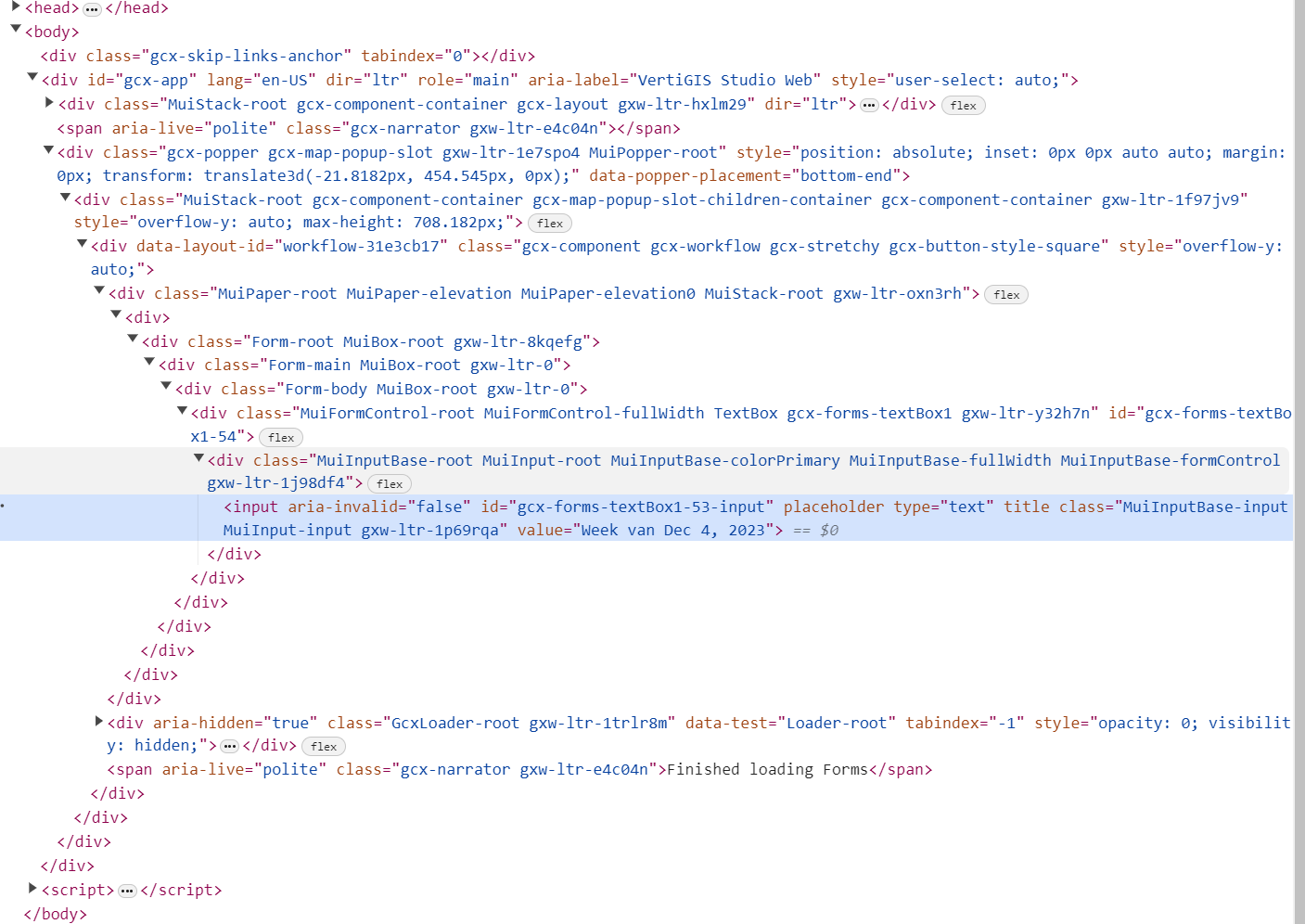
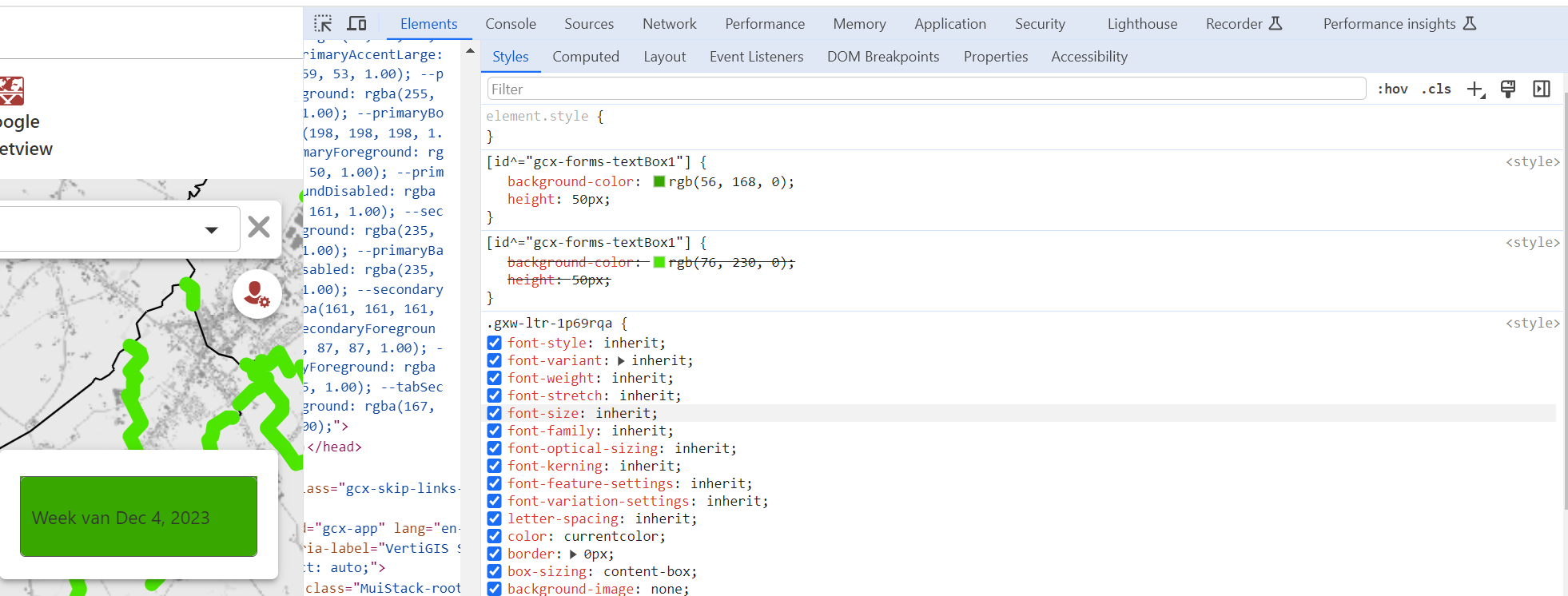
- What CSS are you adding in your workflow that targets those elements?
=`[id^="gcx-forms-textBox1"] {
background-color: rgb(${$CSSColor.result[0]},${$CSSColor.result[1]},${$CSSColor.result[2]}) ;
height:50px;
}`
The colors I get through a query on the layer, from there I get the renderer and in that way I can set the CSSColor dynamically.
For the workflow I'm using the hover event in the Studio Web Designer and I run my workflow in the target popup to show the populated display form textbox.
Hope this makes it a bit more clear.
Thanks in advance
0 - What HTML elements get created in each popup?
-
Hi Andreas Broothaerts,
Like the original poster, if you use the Inject CSS activity repeatedly you are just going to keep adding new CSS rules to the page, but nothing will ever take away the previous ones. They will build up indefinitely and you will get competing rules. The activity is intended to inject CSS once. It isn't suited to a use case like this where you need a unique style every time the workflow runs.
If you want the last CSS added to win then you would need to increase the specificity of the selector. That is possible, but I do not recommend the overall approach. It would just be hiding a problem.
If your total list of colors isn't too massive you could Inject CSS like this once:
.gcx-forms-redBackground {
  background-color: red;
}
.gcx-forms-greenBackground {
  background-color: green;
}
...
Then use the Set Form Element Property activity to set the styleName property of the TextBox form element to an appropriate class name like “
redBackground”. Note there is a “gcx-forms-” prefix that gets added to the styleName.0 -
@... Hi, thanks already for the elaborated answer:
Would you have a sample workflow regarding this?
I don't seem to get the syntax right for some reason.
Also as this is not the recommended way, what would be an alternative solution?Thanks!
0 -
Andreas Broothaerts,
Try this workflow https://latitudegeo.maps.arcgis.com/home/item.html?id=f8f434a3e9b642209f2093aeae0d64d0
- It uses the Get/Set Application Data activities to ensure it only loads the CSS once.
- The CSS contains a fixed list of styles.
- Those styles target the TextBox <input> element rather than the whole TextBox component.
- On the change event of the Drop Down List it sets the styleName of the TextBox to match one of the known styles based on the selected value of the drop down.
A word of caution (for everyone). The Inject CSS activity is a useful and powerful tool but there are many reasons to avoid it:
- You can easily mess up the styles of the host application if your CSS is not specific enough.
- The form elements you are targeting are complex and made of many nested elements. The structure of these elements change over time, sometimes quite drastically. Your CSS may not work in future versions.
- If your CSS is constructed at runtime using values that could be supplied by the user or some other service (like a layer query) whose content you do not trust, you are making your app vulnerable to an injection attack.
- The out-of-the-box form elements adhere to very rigorous style and accessibility guidelines. Most custom CSS changes we see (including the ones in my sample) break both of these.
0 -
@... That worked! Thanks for the help and the information!
0
Please sign in to leave a comment.
Comments
9 comments