Geometry Picker Layer Does Not Clear in Map After Form is Submitted

I have a workflow that consists of several forms. In one of the forms, Form A, there is a Geometry Picker where the user draws a line in the map. On submission of Form A, I want whatever geometry that was drawn to be removed from the map.
The result of Form A determines the next form to display. If the user clicks a button that reloads Form A (the same form they just submitted), the geometry does disappear. If the user clicks a button that redirects to Form B (a different form), the geometry remains in the map.
I've tried using a Set Form Element Property tool to reset the geometry field's value to none, but this doesn't work.
Form B does not have any Geometry Picker fields in it...
-
I just tested this and couldn't replicate the behavior in GVH, but can in Web AppViewer.
Wish I could tell you that I had a solution for you, but I've been unable to get that markup clear. This is a pattern for me though, so hopefully someone else has a solution.
0 -
I only have access to the Web AppBuilder widget, so unfortunately can't use a GVH workaround. For what it's worth, we recently migrated our web server to AWS and upgraded to ArcGIS Server 10.51, which is when I noticed this behaviour.
0 -
Hi Carl,
I looked into workarounds, but didn't have much luck. You could put a Get Map activity after the first DisplayForm, and then use that result to provide an id for a Clear Graphics Layer activity. Eg.
=$map1.map.map.graphicsLayerIds[$map1.map.map.graphicsLayerIds.length-1]
That would clear the latest graphics layer, which would typically be the one that the geometry picker created for the highlights. But as soon as you use another Geometry Picker in the workflow, the old graphics will reappear. So I'm not sure this will be useful in the case you described where the workflow may end up redirecting back to the original form.
I'll get the issue into our bug tracker.
0 -

Did this issue ever get resolved?
Thanks,
Frank
0 -
@Frank Martin? The issue got logged as BUG#29306, and it's marked as fixed in Workflow 5.17. It's mentioned in the release notes here https://docs.geocortex.com/workflow/latest/help/Default.htm#wf5/help/release-notes.htm (CTRL + F for 29306)
0 -
Amanda,
Thanks. That's not the behavior I'm seeing. After a geometry point has been selected and submitted the point is still highlighted when the workflow completes. See the images below. Is there something I'm missing in the configuration.? Also, I'm using Workflow 5.19.
Point select:
 After submit button is selected: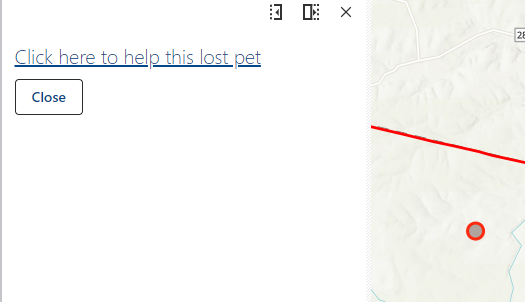
The workflow returns to the starting point:
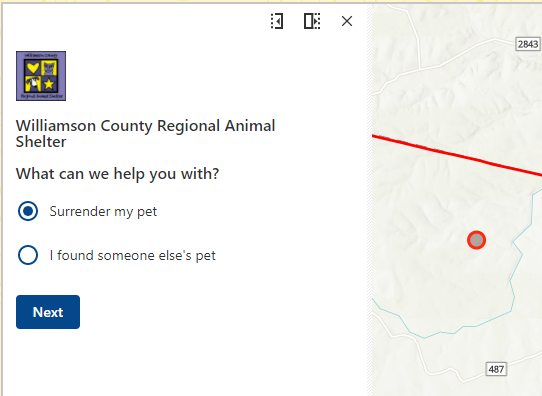
Thanks,
Frank
0 -
Also, I forgot to mention that I'm running the workflow in Web 5.11.0
0 -
Did you ever find a solution? After the geometry is chosen in my workflow, the graphic needs to go away or it shows up on my exported map and looks weird. Trying the get map route but so far not doing well.
1 -

Definitely having this problem. Looks like my only option is somehow editing the geometry array itself?
0
Please sign in to leave a comment.
Comments
9 comments