Handheld Container Height

Hello, 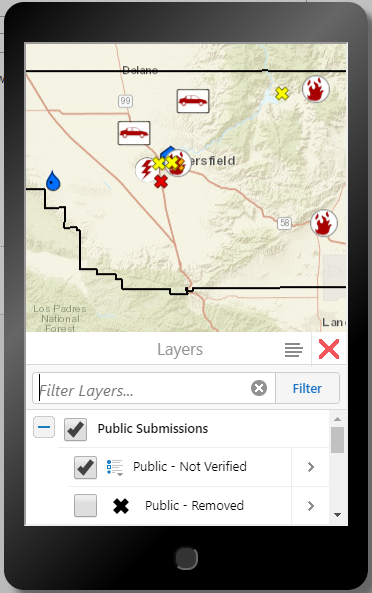
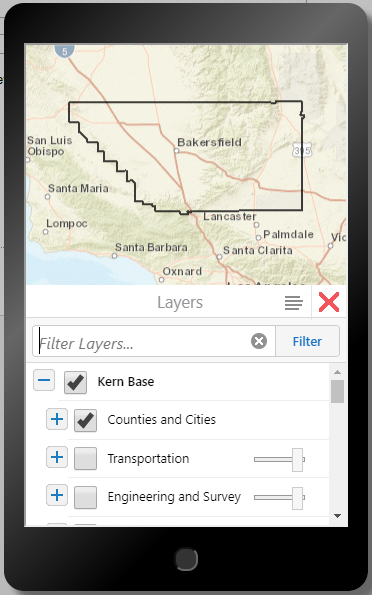
We have a map that is intended for inspectors to use out in the field in the event of an emergency. I am preparing to present this map (in two days) to a group of people that may use this the next time an emergency occors. I was testing it on my iPhone, and I noticed that the container is shorter than usual for everything (workflow containers, the layer list, the home panel, etc.). When the layer list is open on my phone for the emergency map, I can only see about 3.5 check boxes. I compared this to some other maps we have, and I can see 5 check boxes in the layer list for any other map. (The pictures below are screenshots of previews in Manager.)
Normally this wouldn't be a big deal, but there are several workflows in this map for the inspectors to add and edit data. Upon tapping a text box within a workflow, the keyboard pops up on the screen. Initially, the workflow container pops up so that the text box can be seen above the keyboard. However, it promptly moves back down so that the keyboard is covering the entire workflow container. This makes it impossible to see what you are typing and nearly impossible to edit the resulting text.
I also tested this map on an Android phone, and the text box you're typing in stays above the keyboard. However, the employees using this map in the event of an emergency will most likely be using iPhones.
I am not sure how the container came to be so short. Our GIS Specialist created this map about two years ago, and she just went out on maternity leave a couple of days ago, so she will be out for about three months. I checked the css file, but there are only two items in there, and they're for text wrapping and spacing, so they do not affect the container at all. Just to be sure, I tried removing them from the file, saving it, and reloading the map. It did not make a difference.
If anyone knows how to adjust the height of the handheld container or, better yet, keep the text box above the keyboard, I would really appreciate some help!
Thanks,
Denise
0
-

Hi Denise,
I realize it's been a year since this was posted. I hope your demo went well. We'll try to get the screenshots restored as well.
We may have styling that could be applied to the viewer to either shrink elements or provide better hints for the way things appear, but I'm not sure offhand how to do that. If this is still an issue for you, please open a support case so we can assist!
Regards,
-Malcolm0
Please sign in to leave a comment.
Comments
1 comment