Measure tool not showing length for individual segments

I can't figure out why the measure tool stopped showing the lengths for the individual segments. Has anyone had this happen to them? They work on our other apps, but not one of the apps. I checked settings, and they appear to be the same across the various apps.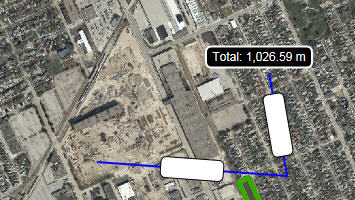
0
-

Hi Allison,
I have seen this happen when you have white numbers on a white bubble, check the "Measurement" page in Essentials Manager. Text colour should be set to a value and not blank.
It can also be your geometry service but since you have a total value I am guessing it is OK.
Regards,
Wayne0 -
Thank you! That worked.
It was odd because the configuration on the other apps have the colour blank and they work fine. I'll make sure to check for this in the future! I appreciate the quick response.
Allison0
Please sign in to leave a comment.
Comments
2 comments