How to move button on a form

The answer back then was that it is not possible. Is that still the case?
I currently have a form that looks like:
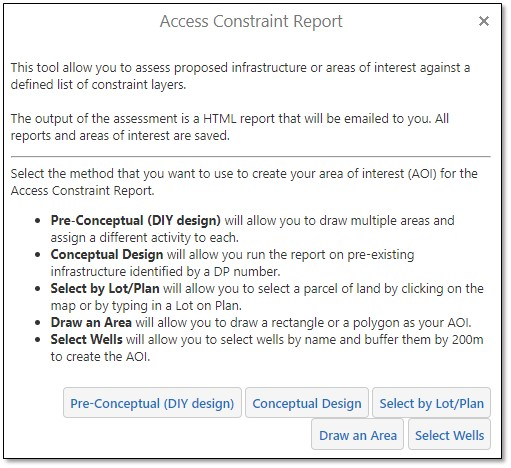
And I've been requested to make it look like:
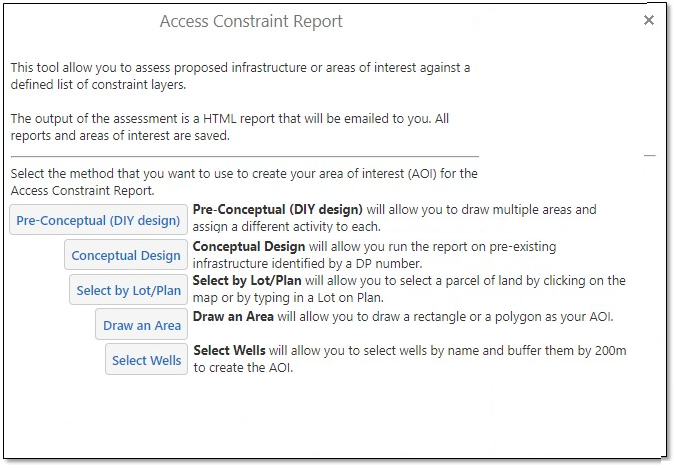
-

Geocortex Workflow (Workflow 5) has better layout capabilities for forms, e.g. Button bar elements. 0 -

If you don't want to use Workflow 5, you could always switch to using radio buttons and put an OK button at the bottom. 0 -
Thanks Denise, I have used radio buttons on other workflows and it's likely that I'll have to go down that path to replicate the requirements as best as possible. I will be giving Workflow 5 a go as well as per Nico's suggestion but I haven't put in much time on that yet. 0 -

Late to the party, I know, but for posterity (quite possibly myself) here is the answer to your original question, aside from using WF5 instead which remains the recommended method. I needed to dust off one of my old workflows to answer this question myself last week for a good old Essentials workflow..
Within the Display Form's RuntimeModifications, add a Get Execution Property activity with a type of FormButtonList (in the Geocortex.Forms.Client namespace, you'll need to Browse for Types). The property name is "FormButtons" and the output object will by of type FormButtonList, which is an enumerable container for the buttons of a form.
The FormButtonList is essentially a list of FormButtons with methods like Add(FormButton), Clear(), Insert(index, FormButton), Move(oldIndex, newIndex), and RemoveAt(index). I have been using the Essentials Workflow Collections activities (e.g. Add To Collection) instead of the Invoke Method activity, so can't attest to whether using that will work.
0
Please sign in to leave a comment.
Comments
4 comments