CORS error with Send Web Request

I am trying to use the 'Send Web Request' activity to pull records from our city's permitting system via an API. I cannot figure out how to get around the browser's CORS policy. Please see the image of the browser console:
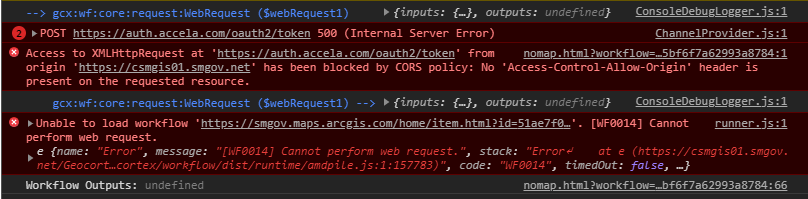
I have tried using the 'Register CORS URL' activity but that didn't work. Am I missing something obvious?
I have attached the basic workflow. There are no details in the Send Web Request activity besides the URL so that I can test this issue.
-
Here is the workflow.
-1 -
Hi Zach did you ever figure this out? I've got a very similar issue. I'm adding in headers
{"Content-Type":"application/json","Accept":"application/json"} but have had no luck.
The API endpoint i'm passing to is public so there's no need for auth on this one. None the less I'm stuck on the cors errors
0 -
Is this not configured in the Geocortex Manager? In the "Security & Data" tab under "CORS". I feel like the idea of "register CORS URL" in a client side workflow is a little risky but I don't actually know the implementation details.
0 -
It definitely is configured there, though I do not know how WF5 operates with it. I've set the IP of the server I'm trying to request rescources from in GE manager, along with in IIS , I've added the header Access-Allow-Origins to * to literally let anything through. However none of this seems to affect much on how WF5 makes the web requests.
0 -

@Shawn Roberts? FYI, some Web Browser Plug-ins exist, that allow you to send cross-domain requests. You can also override Request Origin and CORS headers.
Some of my coworkers work with Moesif Orign & CORS Changer plugin, and it works pretty well! Hope this helps.
0 -

Can anyone post some examples for PUSH Syntax within the workflow manager?
0
Please sign in to leave a comment.
Comments
6 comments