Is there now a way to open a web page in Workflow 5 when using the workflow in the Geocortex Web?

I have a workflow that will build a URL path, but I can figure out how to select it in Workflow 5. I prefer to select the URL in a button "click" event, but just creating a "Click Here" hyperlink would be a good start. Any assistance would be greatly appreciated.
Thanks,
Frank
-
I figured this out. I just need to use the "Run Command" activity with the command "OpenWebPage" and the URL. Yikes... moving between two worlds. 🙂
0 -
The "OpenWebPage" command works fine when the WF5 is executed in GVH5, but I get the following from Geocortex Web.
Is this a case the this particular command isn't available using the workflow in Geocortex Web?
Thanks,
Frank
0 -
Had to attache the "OpenWebPage" error image
0 -

I am getting the same error. Did you find a soloution to this issue, @Frank Martin? ?
0 -
HI Kristine,
No, I haven't found a solution to this issue. In speaking with Latitude, I was told that the "OpenWebPage" functionality has not been developed yet in Geocortex Web. It's on their list, but there is no timeline on when it will be completed.
0 -
Ok, thank you for the update, Frank.
I just imagined this would be an easy thing to fix, but I guess I'm wrong there.
0 -

Hi @Kristine Smaadal? and @Frank Martin? ,
By chance, after nearly one year, did you find a solution ?
0 -
Hi @Benjamin Delsart? and @Cécile Coutelier? ,
I ended up creating a URL and then displaying hyperlinked text in a Display From.
The Create Value input ex.: ="https://bobsburgers.com/Forms?FullAddressfromGIS=" + $EncodedFullAddress.result + "&Jurisdiction=" +$Jurisdiction.result + "&GeoY=" + $projectGeometry2.geometry.y + "&GeoX=" + $projectGeometry2.geometry.x
The Create Value output: wcrasURL.result
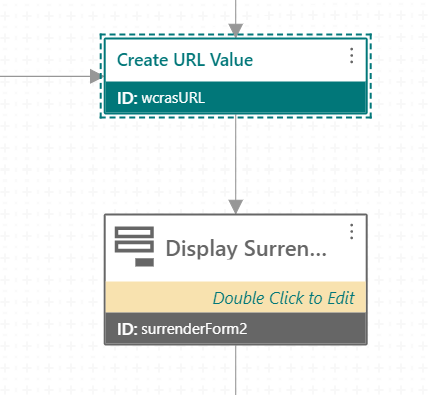 I added a Text element and created an load event in the Display Form
 In the load event, I used a Set Form Element Property activity to set the Property Value of the "description" for the Text element using the output from the Create Value activity. The Property Value:
 ="[Click here to fill out the surrender pet form](" + $wcrasURL.result + ")"

Below is the resulting hyperlink shown in the workflow.

I hope this helps.
Regards,
Frank
0 -
Hi @Frank Martin?,
Thanks for this complete answer ! That's what we end it up doing too.
The first idea was to launch a url directly from a button component (but without the "OpenWebPage" command it's look impossible) to avoid to the user to first open a form and after click on the link.
Sincerely,
Ben
0 -

thanks Frank Martin for posting this solution - much appreciated
0 -

There is a "system.open-url" command that is essentially the same as OpenWebPage from GVH (see https://developers.vertigisstudio.com/docs/web/api-commands-operations-events).
There is also an "Open Window" activity in the "JavaScript Web APIs" activity pack that you can add. It provides a few more options.
Personally, I like Frank's solution best. It will always work and always provides feedback to the user. The other two might not give the user any indication that they are opening a new window, and they can be blocked by popup blockers.
0
Please sign in to leave a comment.
Comments
11 comments