How to enable "Reset" of a form dynamically?

I hope to reset a Form(Display Form) dynamically based on which the activity returns to the Form.
For example, There is a switch activity. When it's Yes, it returns to the Form with Reset property as true. On the other hand, when the switch is No, then it returns to the Form with Reset property as false, so that end users can see what have set up previously.
Is it possible to do this? Thanks.
-
Yes this is possible, I have done this multiple times.
You need to first save all the user input from the display form to another object/variable because the standard behavior of a form is that it resets on reload, in which case you lose the earlier user input.
Then you need a variable that tracks if a reset needs to happen or not. You can do this by for example customizing the button bar in the form. If a user exits the form you can retrieve which button they choose which you can use to set the value of the reset variable.
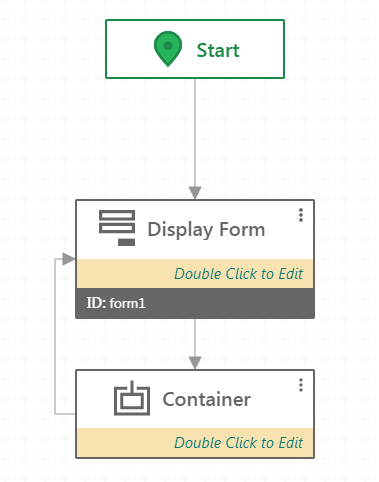
You need to ensure that the user returns to the display form, i.e. you need to connect it to itself. Sometimes this doesn't work so I put an empty container after the display form and connect the container back to the display form:
 Finally you need to create a subworkflow on the loading of the form, I do this by selecting the title of the form, then navigating to the right side of the screen to events, unfolding the dropdown and clicking on add next to load. In the new subworkflow you use a switch to test what the reset value is. If it is yes you don't need to do anything else, the form auto-clears. If it is no then you use the Set Form Element Property, Set Form Element Item and Set Form Element Item Property to re input the user values you saved.0
Please sign in to leave a comment.
Comments
1 comment