How to pass more than one Graphic as a parameter to a Map Export Web Request

I have a Web Request that sends the current Geocortex map (HTML5) to a report. I have added 2 different graphics to the map. Only one of the graphics is appearing in the map on export.
I have the following configured.
I have a Create Value that holds the 2 different graphics:
={"layers": [{
"elements": [{
"geometry":$getFeatureGeometry1.geometry,
"symbol": {
"type": "esriSFS",
"style": "esriSFSForwardDiagonal",
"color": [0,0,0,64],
"outline":
{
"style" : "esriSLSDash",
"color": [0, 0, 0,255],
"width": 2.5
}
}
}]
},
{"elements": [{
"geometry":$getFeatureGeometries1.geometries,
"symbol": {
"color": [168,0,0,64],
"outline": {"color":[0,0,0,255],
"width": 1,
"type": "esriSLS",
"style": "esriSLSSolid"},
"type": "esriSFS",
"style": "esriSFSSolid"
}
}]}
]
}
I then add the results from the create value into the web request JSON as the graphics:
={"f":"pjson",
"outputFormat": "PNG",
"bbox": $mapExtent1.extent.xmin + "," + $mapExtent1.extent.ymin + "," + $mapExtent1.extent.xmax + "," + $mapExtent1.extent.ymax,
"imageWidth": "316.15",
"imageHeight": "254.17",
"scale":$mapExtent1.scale,
"layers": "81(hide:*); 75(hide:*); 72(hide:*); 69(hide:*); 67(hide:*); 63(hide:*); 82(hide:*); 65(hide:*); 61(hide:*); 60(hide:*); 54(hide:*); 46(hide:*); 64(hide:*); 49(show: 41,42,43,46,47,48,49); 1(hide:1,2,3,4,5,6,8,9,14,22,28,29,30,31,32); 55(hide:*); 58(hide:*); 56(hide:0,1,4,5); 57(hide:*); 48(hide:*); 20(hide:*); 59(show:15,16,20,21,23,24); 40(hide:*); 39(hide:*); 38(hide:*); 42(hide:*); 15(hide:*); 83(hide:*); 84(hide:*); 85(hide:*); 86(hide:*); 87(hide:*); 41(hide:*); 22(hide:*); 2(hide:*); 3(hide:*); 74(hide:*); 5(hide:*); 7(hide:*); 8(hide:*)",
"graphics":$MasterMarkup.result}
I can see that it is being sent to the web request correctly.....but only 1 of the graphics is being displayed.
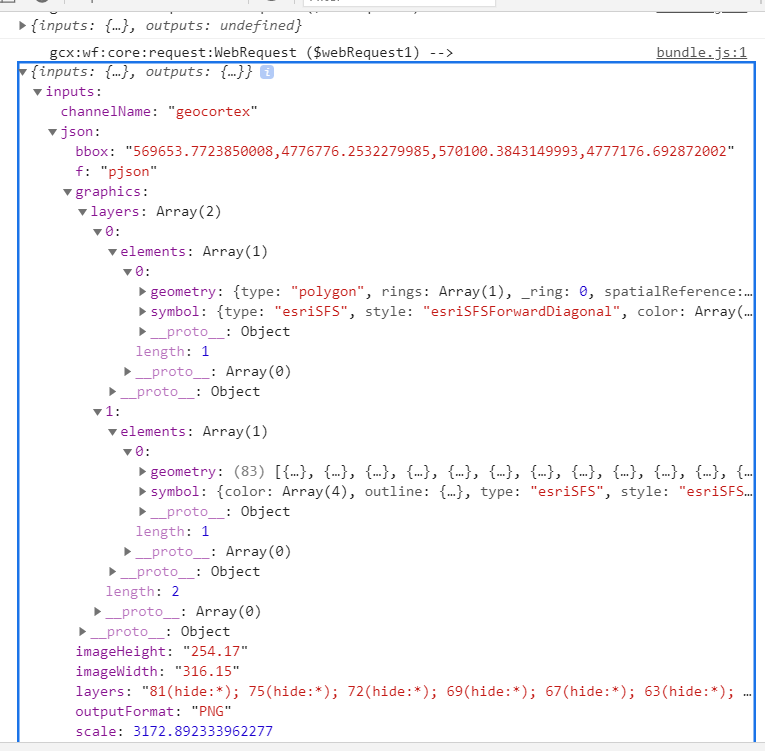
The one graphic is a feature set of parcels. I am wondering if it has to do with using multiple geometries instead of 1 geometry.
If that is the case, how do I send multiple graphics to a map export?
Please sign in to leave a comment.
Comments
0 comments