How to unlink shared components configuration?

One of the new features in 5.10 as per the documentation is the ability to unlink components that are sharing configuration. If I'm reading this correctly this means we can have two different layer lists components in the same app with different configurations? If yes, could you please let us know how this can be configured as it looks like it's not possible from the Designer?
-

Hi Ahmed,
You have the right idea.
The most common use case for this is when you have a multiple-layout application and you want a single configuration for a component found in both layouts.
For example, if you open the 2D-3D multi layout template. If you are working in the 2D layout and look at the toolbar in the component tree you'll see something like this:
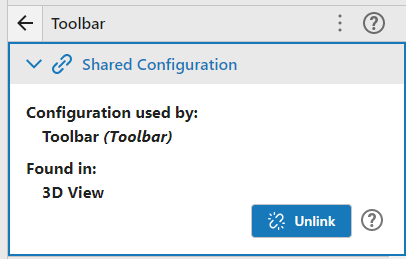 Having the toolbar in your 2D layout and the toolbar in you 3D layout linked means that if you change the configuration for the toolbar in either your 2D or 3D layout you are changing a common underlying config ... making it very easy to ensure the toolbar stays in sync in both your layout views. If you instead wanted to configure a toolbar that was unique to the 2D layout and a different toolbar unique to the 3D layout then you would unlink these and then they would no longer share config and could be configured independently.
To your legend example. A legend is dependent upon a map that drives its content. A similar, easier example might be scale bar. I can add two scale bars, each dependent on the same map, but configured differently.
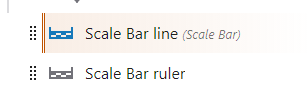 ?
?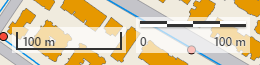
These two components are not sharing configuration, they are just referencing the same map dependency.
Hope that helps.
Cam
0 -
Thank you Cam.
What we are trying to achieve is to have two layers list components in the same layout template each showing a selected numbers of layers from the same map. I thought this is achievable if we can unlink the configuration of the two components.
We are considering this as a workaround to organise layers in apps with relatively large number of layers, where multiple layers lists will be configured based on the category of the layers and then users can select which layers to be shown on the app using a workflow.
Ahmed
0 -
Good idea Ahmed, but currently it won't help you.
When you configure whether a layer is included in the layer list or not, that is currently stored as part of the layer configuration ... so excluding it from one layer list will exclude it from all.
0 -
Hi Cam, is it possible to change layer's configuration through a workflow?
0
Please sign in to leave a comment.
Comments
4 comments