onClick action error: language-feature-sources-error

I am getting an error when I click on some layers in my map in Geocortex web.
The popup has no custom configuration and works fine in Portal Map
Running Geocortex Web Version 5.11.0
Screenshot attached,
inspect tool text:
arcgis-extensions-core.min.js:1 [map]: An error occurred while executing the map's onClick action.
_log @ arcgis-extensions-core.min.js:1
arcgis-extensions-core.min.js:1 Error: language-feature-sources-error
at r (main.907e3188.chunk.js:1)
at t._addFeatures (/webviewer/static/js/common/components/FeatureDetails~web/components/feature-summary.5d9fe969.chunk.js:1)
at async displayResults (/webviewer/static/js/common/components/FeatureDetails~web/components/feature-summary.5d9fe969.chunk.js:1)
at async t._executeIfApplicable (/webviewer/static/js/common/components/FeatureDetails~web/components/feature-summary.5d9fe969.chunk.js:1)
at async Promise.all (/webviewer/designer/index 0)
at async Object.n [as parallelEach] (arcgis-extensions-core.min.js:1)
at async o (main.907e3188.chunk.js:1)
at async r.execute (main.907e3188.chunk.js:1)
at async I._executeOnClick (/webviewer/static/js/web/components/Map.36dd358b.chunk.js:1)
at async I._onMapClick (/webviewer/static/js/web/components/Map.36dd358b.chunk.js:1)
-

Hi Peter,
A few things going on here. First, that language key should be displaying 'The following feature sources encountered errors and cannot be shown'. This indicates that the feature cannot be extracted from the feature layer when clicked on, which could indicate an issues with spatial references or the web map itself. Have you made any changes recently to the underlying map?
Thanks, Stefan
0 -
Thanks for the reply Stefan. My prod map has and will continue to constantly change.
To test thoroughly, I have added to a fresh map with nothing else, and added to a template fresh site with nothing else. Just one layer. Problem persists.
0 -
Interestingly I added the layer into Portal via the browser and published that way and it behaved. But when I published through Pro it failed. I will continue to to a bit more incremental testing tomorrow, just thought someone might be able to go Boom! I know what that error means. Wishful thinking I guess :)
0 -
OK so I have removed almost all fields, removed z values from poly, removed m values, repaired geometry, checked it has a well known coord system, republished via pro, added to brand new map, grabbed brand new GXW app (web gis - default) and I still get the error in GXW. No error in map viewer.
When upload to Portal via the browser as zipped fgdb and it created an associate feature layer, no problems.
The Pro publishing step must be doing something to it that GXW doesn't like.
I'm getting a colleague to test from their machine also today.
Our org is about use GXW in a big way so will be good to get to bottom of this.
0 -
I can get our admin share any apps etc. with you if that helps @Stefan Schweigert? .
cheers,
0 -
@Peter MacKenzie? : If you are able to share a web map that can reproduce this issue, or an app that loads the web map, that would be perfect for us to take a look into.
We've seen some varying behaviours when services are published through ArcPro, so we'll want to take a look at this one.
0 -
well actually, if you add that fgdb (attached) to a brand new map / app - do you get any error messages?
0 -
@Stefan Schweigert? , to add to this, I mean using Pro for the publish process
0 -
One of my fresh-eyed coworkers found a cause; an unconfigured popup for a polygon layer.
It appears that any polygon feature class that has the default "fields" popup when shared out of Pro instead of a "text" popup results in a a not-configured popup in the portal map. GXW seems to error on these. Our workaround for now is to create a configured popup in Pro for all polygon layers - I think it's just polygons.
0 -
Thanks for letting us know! That information is very helpful in handling the underlying issue properly.
0 -

Hi Peter,
We have a fix coming along in soon-to-release GXW 5.12 version. I tested using your attached gdb file published through Pro. It appears resolved.
If you continue to see the issue in the future 5.12 release, we may need to bother for an access to your portal hosted layers/webmap/app seeing the issue. So we can inspect the the json closely.
Cheers,
Pairin
0 -
Thanks for the reply Pairin. We have loads of layers that get added and removed frequently in our sites so using the 'all fields' option is a great option of have at our disposal.
0 -

Hi @Pairin Mason? ,
I work with @Peter MacKenzie? .
I can confirm that this error is still happening at 5.12.
It seems to affect polygons and lines, but not points. It affects layers hosted by us and services we connect to from other organisations. The only solution we've found so far is to change the Pop-ups in webmaps to NOT display "A list of field attributes". With the number of layers our applications display, and the update cycle we need to maintain, this is not a viable solution.
This is greatly affecting us and the confidence people are having in our applications. We need a solution to this ASAP.
 0
0 -
Hi @Leon Bowers? ,
Is it possible for us to have an access to the webmaps containing hosted layers and services that are throwing errors when clicking?
You can share them to pairin.mason@vertigis.com
Cheers,
Pairin
0 -
Note: This identify/popup error issue is now captured in our GXW queue (45831))
0 -
Just to add to this. I've also noticed this same error when running a search in the search window. Even if all my layers have popups configured, it shows the error. Hopefully it's all related and will be fixed together but you'll need to test the search functionality too.
0 -

I'm seeing the same issue when running the Search tool using GXW 5.13. The error occurs but if you close the error dialogue the search will continue and you can select results.
On a related topic, it would be useful if the Search tool could be configured to only use the geocoding service and not attempt to search through the web map's layers. This would likely avoid this error occurring, at least in the Search tool.
0 -

Stefan Schweigert
I know this post is 2 years old. But I want to add a comment, that I'm encountering the same issue in VertiGIS Studio Web 5.26.1.
This is an error what shows up when i try to click to idenify a layer on the map.

And this is what I see in the dev console

Any ideas what's causing this error?
Thank you,
Nataliya
0 -
Actually, I was able to figure out the issue.
One of layers listed in the error message above (Environmental Reviews), has some links configured in the web map pop-up. One of the links has dynamic url parameters (Create a FIRMette). When a user clicks on the link, the link graps a property address, and navigates to FEMA website to select a FIRMetter for that address. For some reason that link was causing the problem (I have that link working in my old Essential sites, that I'm rebuilding in VertiGIS web). But once I narrowed it down to that the link was cousing the issue, I manually retyped the URL for the link, and now everything is working as expected.
One of the things that I don't understand is why I couldn't clickOn (identify) other layers, if only one specific layer seem to have had an issue.
 0
0 -
Hi Nataliya,
We've seen this error come up in a few scenarios. Could you provide more details about the layer that you are seeing this with? Is it a WMS/WFS? Do results still return?
Thanks, Stefan
0 -

Stefan,
I started to get this error upon searching for data using the Search Bar. I created a new web map and a new VertiGIS app and I am still getting the message. This wasn't happening last week. I do know that are Servers were patched over the weekend. We currently have this layer in a GeoCortex App and searching works just fine.
Layer is Published using ArcGIS Pro
 0
0 -
Hi Raquel,
Could you provide more information about the layer? We've seen this error appear when using WFS layers mainly, but we are aiming to improve support with the next release. If there is the possibility to access your data publicly or through a file share, that would be ideal.
Thanks, Stefan
0 -
Stefan,
It's not a WFS layer.
It is a public map service: https://dnrmaps.wi.gov/arcgis2/rest/services/DG_Groundwater_Retrieval_Network/DG_Groundwater_Retrieval_Network_Ext/MapServer
0 -
 0
0 -
Stefan Schweigert Any traction on this?
0 -
Hi Raquel,
I created a new app and web map using that service and didn't encounter this error using the current SaaS, which is running 5.28.1, with Chrome.
Are there any other steps that I am missing to reproduce?
Thanks, Stefan
0 -
Stefan Schweigert we believe the issue is the way that VertiGIS searches using an intersect because when we invoke the search against this map service using an AGOL Instant App it finds the results immediately, which doesn't use a geometry type search but more of the traditional search Field = “Value”. Is there any way to get VertiGIS search to do just a simple Database Query search ‘Field = “Value”’?
If the well is within the extent it finds it immediately using VertiGIS search but when searching for a WI Unique Well No where that location is not in the extent it generates the error message after a long wait.
0 -
Hi Raquel,
With VertiGIS Studio Search, you can have greater control of the search parameters and increased performance of searches within Web. You can also use the built-in Query Builder component for the use case that you've described for searching.
Thanks, Stefan
0 -

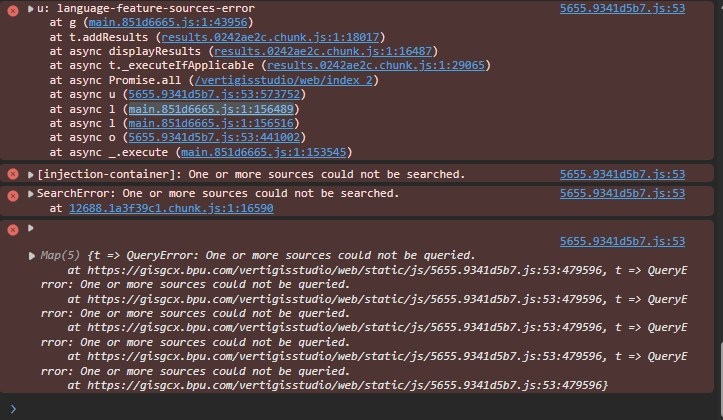
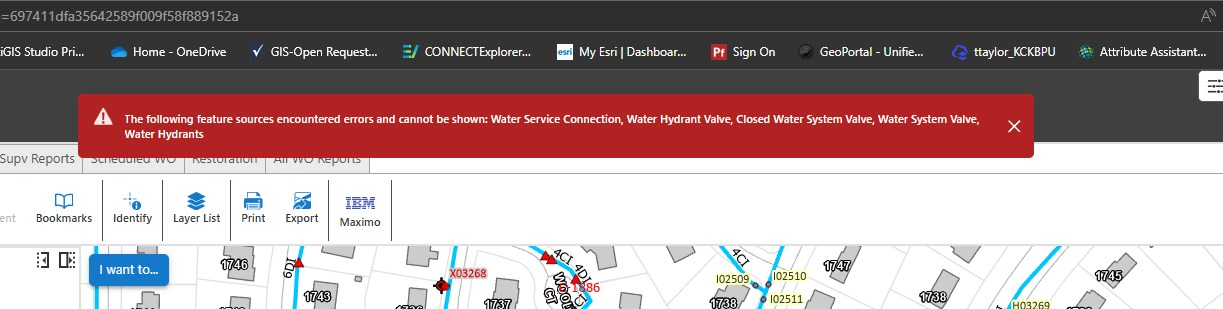
I know this is old but I can't seem to get this red banner to go away. I'm getting successful searches an I've tried just about all I can think of.
 0
0 -

There should be an issue/error in one of the underlying search queries. Check the response of query requests in the network traffic.
0
Please sign in to leave a comment.
Comments
33 comments