Is it possible to configure different zoom level\extent for desktop vs mobile

Problem: the initial extent is appropriate for either desktop or mobile but not both. For instance, if I configure so the map is zoomed to roughly the full city extent on a desktop display, it will be zoomed out much further on a mobile device.
Since one can create different layouts, say for desktop vs mobile, wondering if the initial extent or zoom level can be customized for those different layouts?
Thanks
-

I haven't tried this myself, but I guess you could use a startup workflow with the Get Application Info to get the device, and then use the command viewer.load-layout
to launch the corresponding layout. Please share if you get this to work :-)
0 -

@Zorba Conlen?,
To build a little on @Jostein Svegården?'s idea.
A startup workflow that
* get's the client device info
* chooses a desktop or mobile layout in the app based on screen width (as an example)
* loads the correct layout
https://developers.geocortex.com/docs/web/api-commands-operations-events#command-viewer.load-layout
Could also
* set a map viewpoint and scale based on mobile or desktop
https://developers.geocortex.com/docs/web/api-commands-operations-events#command-map.zoom-to-scale
0 -
Documentation says about viewer.load-layout: Loads a new layout. Can be a layout URL or layout XML, or a Layout object
So, in my app.json, I have a reference to my layout:
{
"id": "Pad-51ed7971-e2e9-43ac-ae71-1ad9796a4e05",
"title": "Pad",
"url": "./Pad-51ed7971-e2e9-43ac-ae71-1ad9796a4e05.xml",
"$type": "layout"
}
How would I pass in arguments to the viewer.load-layout command? I guess maybe { "id": "Pad-51ed7971-e2e9-43ac-ae71-1ad9796a4e05" }?
0 -
@Jostein Svegården?
Here is how I usually figure this out.
I add the built in tool e.g. Switch layout and add it to a button/toolbar/iwtm
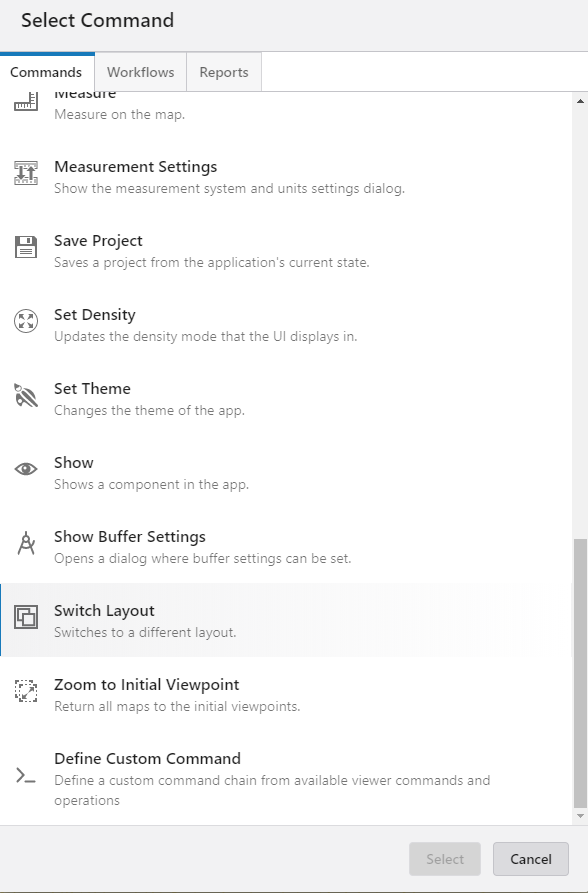 Once added I click the 'customize' icon
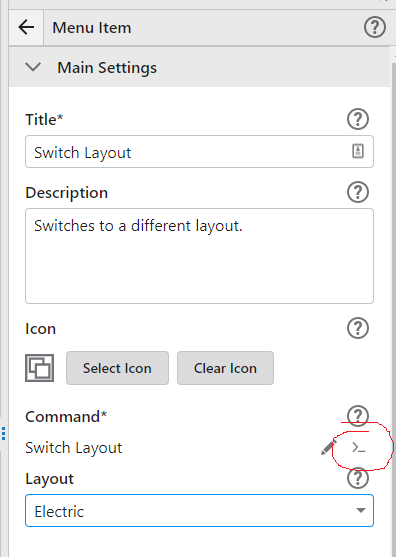 That converts the built in tool to a custom command and I can view the JSON format
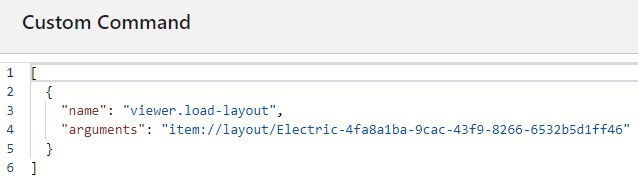 For interest sake, calling the command from Workflow is similar.
Command Name:
viewer.load-layout
Command Parameter:
item://layout/Electric-4fa8a1ba-9cac-43f9-8266-6532b5d1ff46
0
Please sign in to leave a comment.
Comments
4 comments