How To Format an Active Email Link in Template Literal

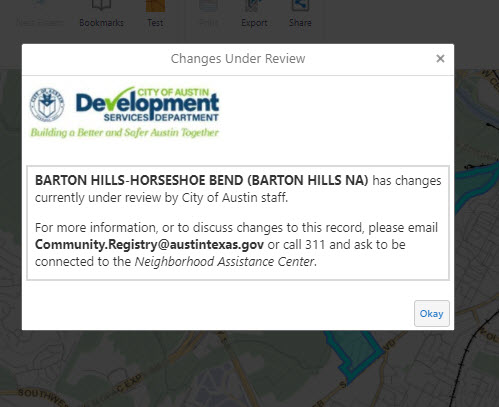 I'm formatting a template literal string to display in a Form Element and would like to have part of the string be an active email link.
Here is the existing string:
=`__${$pendingOrgRecord.item.ORGANIZATION_NAME}__ has changes \
currently under review by City of Austin staff. \
For more information, or to discuss changes to this record, please email \
__Community.Registry@austintexas.gov__ or call 311 and ask to be \
connected to the _Neighborhood Assistance Center_.`
I'd like to make the Community.Tegistry@austintexas.govan active mailto:
-
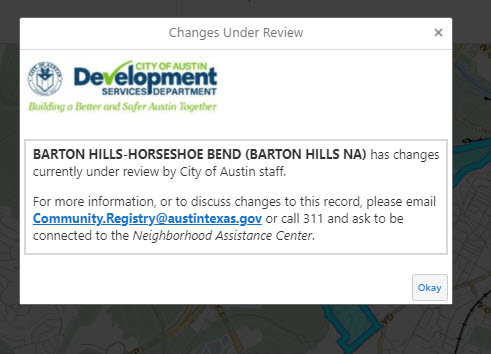
I found the answer. The issue I was running into was that the template literal string I am creating is being put into a Form Element Property description property which is applying markdown. So I just needed to use the markdown formatting for an active email link.
So the correct "template literal" string turned out to be:
=`__${$pendingOrgRecord.item.ORGANIZATION_NAME}__ has changes \
currently under review by City of Austin staff. \
For more information, or to discuss changes to this record, please email \
__[Community.Registry@austintexas.gov](mailto:community.registry@austintexas.gov)__ or call 311 and ask to be \
connected to the _Neighborhood Assistance Center_.`
Notice that even though this is a template literal where the return character should be sufficient to cause a new line, this template literal is going into a markdown situation. Thus the escape slash->space->return is necessary to get the result:
 0
0
Please sign in to leave a comment.
Comments
1 comment