Labelling selected features

?I've searched the forum posts and can't find a full answer to this question (although similar questions have been asked previously).
I want to label the features that have been selected through a query task. I've tried to do this by updating the symbol for each feature using a foreach<graphic> activity to loop through all the features in the FeatureSet. After assigning the text string I want to use for each feature to the new Symbol, I try to assign the symbol to the feature (i.e. Assign Activity: feature.symbol = newsymbol). Whenever I try to run the workflow though, I get the error:
There was a workflow error running activity: Exception has been thrown by the target of an invocation.
Workflow 'commonsearch_query' failed
Aborted exception: 'The calling thread cannot access this object because a different thread owns it.'.
The calling thread cannot access this object because a different thread owns it.
Am I missing any obvious steps? Does anyone have an example of how this can be done correctly?
Thanks,
Peter.?
-

Hi Peter,
The only time that I have seen this particular error message appears is when running multiple server workflows that potentially run or access the same file, which doesn't appears to be the case.
Is there are particular activity that this is failing on? Are you able to share a version of your workflow to review?
Thanks, Stefan
0 -
Stefan,
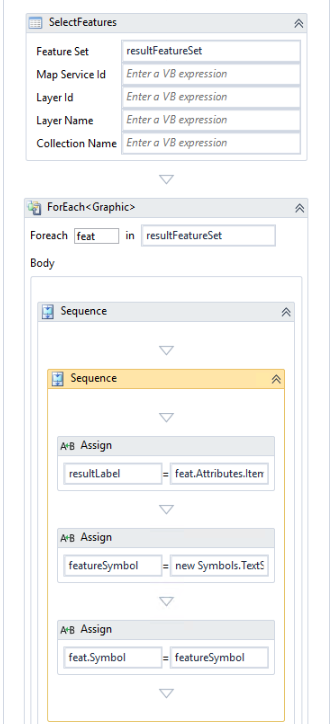
The workflow thows the error when I try to update the graphic's symbol from within a ForEach<graphic> loop (the last Assign activity in the image below) where I loop through each graphic in a FeatureSet (returned from a query task). The reason for this is so I can label each of the selected features with it's official name attribute.
The resultLabel = feat.Attributes.Item("OFFICIAL_NAME").toString()
The featureSymbol = new Symbols.TextSymbol() with {.Text = resultLabel}
 ?0
?0
Please sign in to leave a comment.
Comments
2 comments