[5.33] Identify an activity in the workflow designer from the browser's console
Completed
Introduced in VertiGIS Studio Workflow 5.33
If I add the debug=true parameter to a viewer URL, a lot of useful information about which activities are run is logged to the browser's console.
Activities such as CreateValue that have an ID can easily be identified, because that ID is logged, but for other activities only their type and a number are logged, e.g. --> gcx:wf:core::If (374) .
A workaround is to assign ID's to activities that don't have one, but this will clutter up the list of variables in code completion.
It would be nice if there was a way to identify which activity logged what. This could be achieved by either searching by ID in the workflow designer, or logging the name or description of the activity (and adding a true search capability to the designer, maybe in the navigator pane?)
See here for my original question: https://support.vertigis.com/hc/en-us/community/posts/11497695658514-Debugging-match-console-output-to-specific-workflow-activities.
-

It would be fairly easy to add a way to show the numerical ids for activities in the designer. We'd need to design a way to do this without confusing users who don't care about them.
There is an intentional level of abstraction between the UI and these numerical ids. The assumption being that if you care enough about an activity you can give it a string identifier. I see your point, though.
0 -
Hi Berend Veldkamp,
Today we released Workflow 5.33 which includes a new search feature within the Navigator. If you enter a numeric value, it will find the activity with that id:
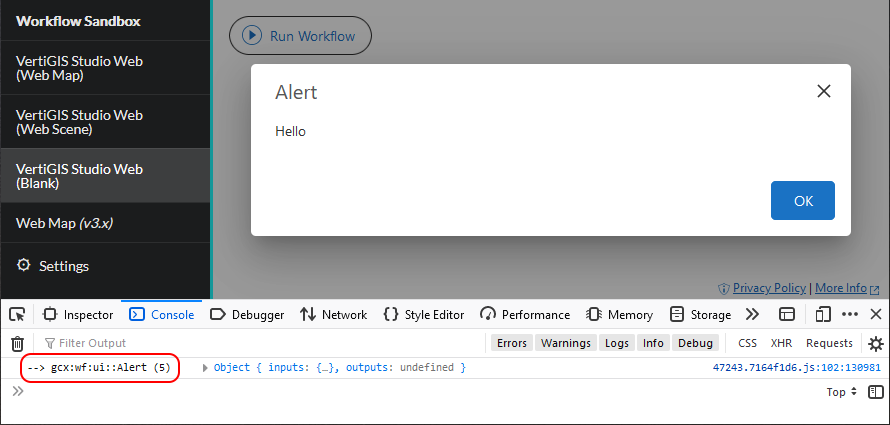
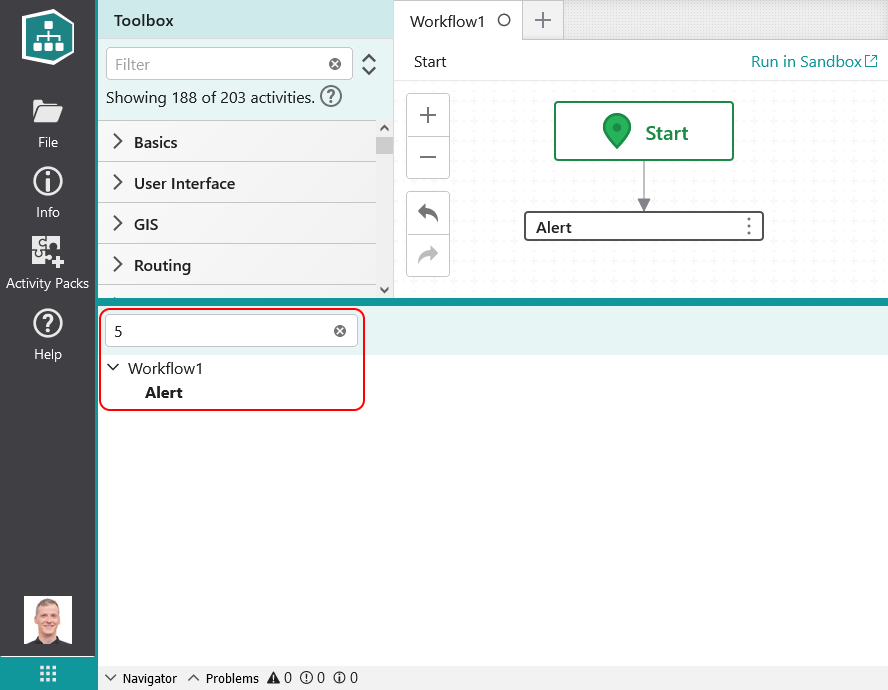
I realize this isn't exactly as visible as you would like, but it is an improvement that I hope you will find useful.
0
Please sign in to leave a comment.
Comments
2 comments