How to 'index' or identify the check boxes in a checkbox group - workflow5. Need Help!

I have a checkbox group in a Workflow5. When checkboxes are selected a 'ForEach' loops captures and concatenates the repective values to a global variable 'Input' to be used later. However, when the last check box ( say 'All') is selected, all other selected check box values must be somehow 'nullified' so not to capture them in the global variable. I know radio button has this feature by default but my form needs checkboxes as sometimes then may select multiple boxes but not the last box 'All'.
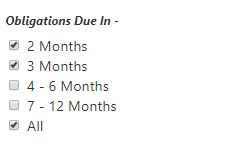
Just need a slight hint as I have tried many ideas to no success. Example below:
Thanks,
Deep N Bhari
ConocoPhillips
-
 0
0 -

Hi Deep,
I've attached an example that will hopefully point you in the right direction.
Here's a summary of what it does:
- Show a form with a checkgroup of hard-coded items. The final one has a value of "all".
- Add a "change" event handler on the Check Group.
- In the change subworkflow:
- Use the Get Form Event Data activity to get the details of the change.
- If the value is "all", this means the last checkbox was just checked. (When unchecking it, the value would be undefined.)
- Use the Set Form Element Item Property activity to set checked to false for the other checkboxes.
- If the value was not "all", make sure the "All" checkbox is not checked.
0
Please sign in to leave a comment.
Comments
2 comments