Display Form Element Position

Why would a Display Form DropDownList Element suddenly drop to the bottom of the form on load of the element content?
There is a Switch in the loading procedure that sets the current item based on a Workflow Input. One of the input types [Streets] causes the DropDownList to drop to the bottom of the form.
I can't identify any difference between setting other DropDown Current items from the Streets item that is causing the element to change position.
-

Hi Sean, pretty sure this is the culprit. It's setting the index for the dropdown within the whole form. Since the form has 3 elements (2 dropdowns and a listbox), 3 is the bottom:
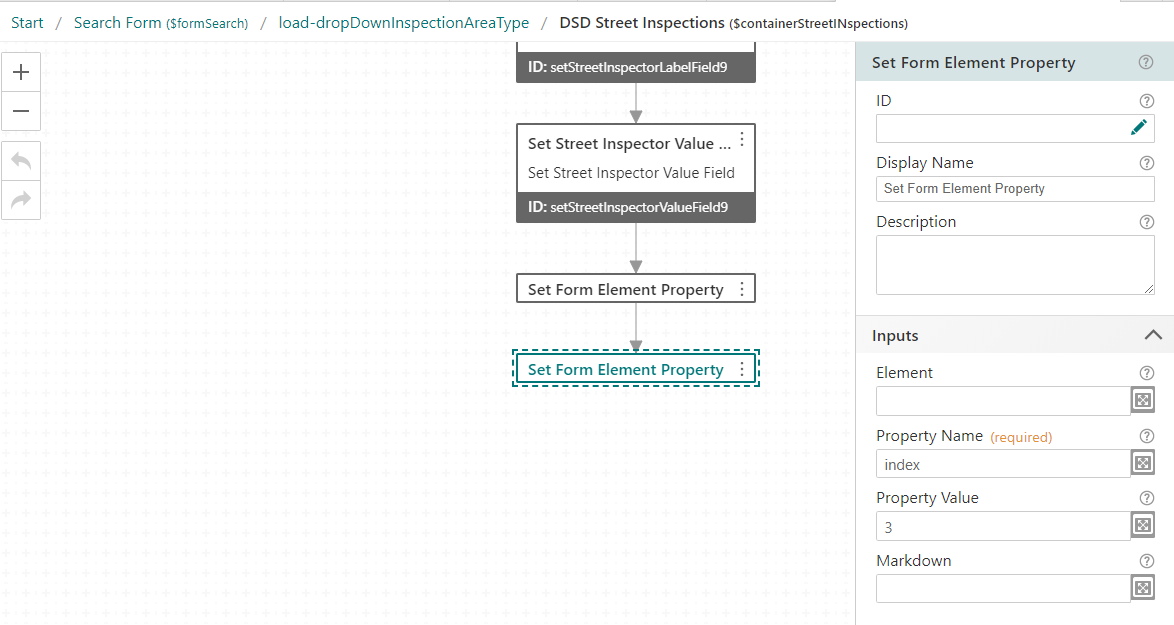
I'm not sure what the goal is for this step, but I'm guessing it might be something like setting the selected item within the dropdown list; if that's the case you would want Set Current Form Element Item
0 -
I knew it would be simple. Like me.
Thanks!
0
Please sign in to leave a comment.
Comments
2 comments