HTML Viewer Speed up

Hi There
Once geocortex is loading, it sends a request to get all site configuration by below format:
https://{main url}/Geocortex/Essentials/GCPortal/REST/sites/{Site Name}?f=json&deep=true&token={token}
surprisingly getting a response is more than I expected and it takes about 14 seconds to get an initial response and then 178ms to download entire JSON files which means gcx servers spend lots of effort to generate the response.
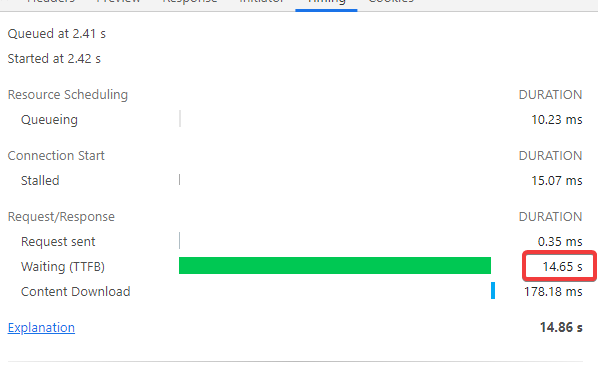 The same thing happen once It wants to load a couple of layer properties:
https://{url}/Geocortex/Essentials/GCPortal/REST/sites/{site name}/map/mapservices/{id}/rest/services/x/MapServer?f=json&token={token}
and here is result:
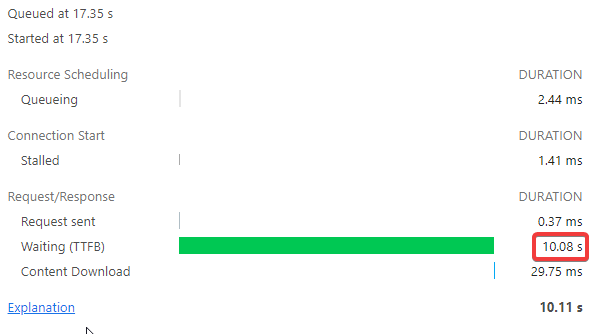 So the question is what would be the best practice to speed up the gcx server to load the application. just by speeding up these two requests, we can save about 30 seconds every time users load the application.
-

Hi Davood
Ten seconds for a site initialization is a significant amount of time. A test site I have with two map services, loading from a site cache, shows about a 60ms initialization.
Initialization is the process of converting the site configuration defined in the
Site.xml file into objects that viewer applications can work with. See here for more details: Essentials Admin - Sites (geocortex.com)
I'd suggest refreshing your site cache, eg open Essentials Manager and click this button
If this doesn't help, consider the number of services in your site. Are there some you could remove? Are there services you know you use heavily that could be fine-tuned?
It may also be worth considering Geocortex Analytics, as this helps identify problematic services.
0 -
Hi Gareth
Thanks for your reply. I'd say my application is fairly a complex application about the 20 map services and site.xml file size is about 900KB.
I tried again by removing the site cache or loading the application in non-debug mode but it doesn't change significantly.
0
Please sign in to leave a comment.
Comments
2 comments