Autocomplete From Collection - Search Part of String

I have an autocomplete form element, in which I am using a collection. It works great, so when user types, the values appear that match. However, I need them to be able to search any part of the string, not just the beginning characters to have it work.
So, if values are ["Bread","Donut","Cheetos"], if user starts typing "eet", they see no results. What I want is to see the only value displayed as Cheetos.
What is proper syntax to achieve this and where does it go? These are my activities currently:
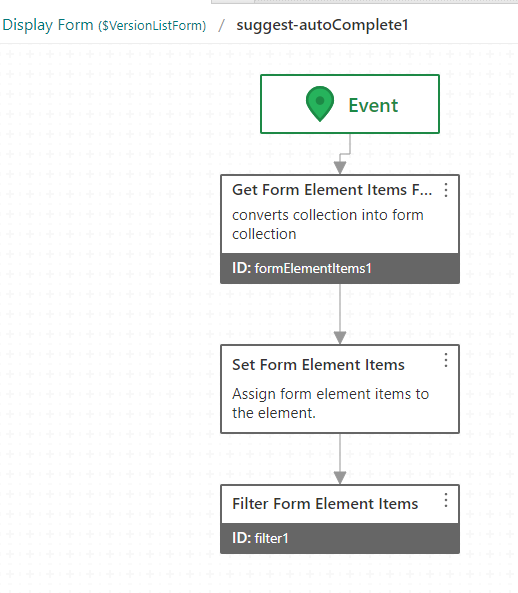
-

Hi Ryan,
You just need to add another % before your query. For example, this query (COMMON_NAME LIKE 'PINE%'_ searches for trees that start with "PINE", while this query (COMMON_NAME LIKE '%PINE%') searches for trees that include the word "PINE" in their name.Here is a sample workflow for reference:
https://latitudegeo.maps.arcgis.com/home/item.html?id=13cb5d4e8f674f48bba963a0a7d77a52I'd recommend using the default autocomplete suggestions template rather than using the Filter Form Element Items activity as well.
Cheers
-- Patrick
0 -
Thanks Patrick. I think this is where I am stuck though. I don't have a where clause to use. I am not using a REST query, as the collection I populated has nothing to do with GIS data... hence my need for the blank start to the subworkflow.
0 -
Hi Ryan,
Ahh yes, one option you could do would be to write a JavaScript expression to accomplish this. I've updated the same workflow with a sample on how to do this.
The expression will look something like =$inputArray.result.filter(x => x.includes($textReplace.result))
That will give you an array with the filtered items. You could then supply that output expression to the Filter Form Elements activity using =$filteredArray.result.join(', ')
Hope that helps0 -
Excellent work Patrick!! Works like a charm! Thank you!
0 -
No problem. Happy to help :)
0 -

Hi ,
Patrick Fingler
Wondering if I can have that JSON file.
Regards,
Scott0
Please sign in to leave a comment.
Comments
6 comments