display sql data - markup - newlines

Hello,
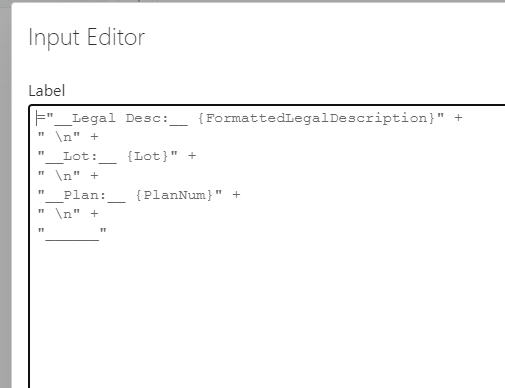
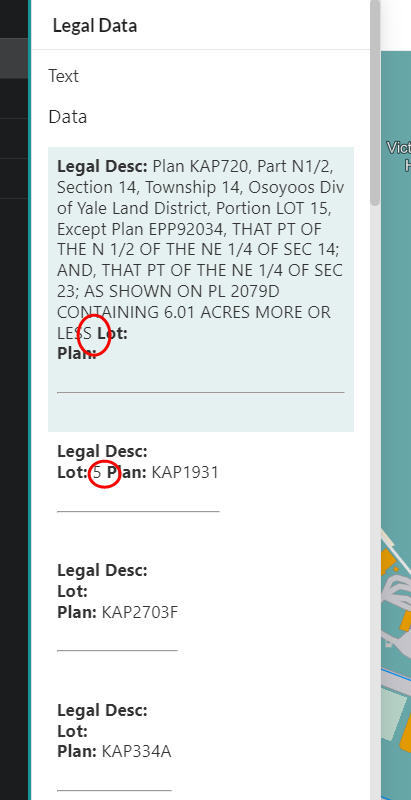
I'm looking for some suggestions to make my returned SQL data look good for the end user. Currently I'm using this markup technique to put the data in an item picker.
1) why do line-breaks get ignored if there is data present? If blank the \n works fine, if there is data then it seems like the \n is getting stripped. It does work with \n\n but I don't want everything double spaced
2) what is the preferred way to display SQL data?
3) is there any way to put elements side-by-side or do all the forms elements need to go in a vertical strip?
4) can we format with html instead of markup?
-

Hi,
These are some good questions!
1) If you want a soft line break (like a "br" tag) in Markdown, you must add either two spaces or a backslash to the end of the preceding line. I personally prefer the backslash as it's easier to see when troubleshooting.
2) I don't think there's anything special about presenting SQL data compared to any other. You might need to consider the browser locale if you're converting dates or currency to text, but that would be true for non-SQL data also.
3) I'm glad you asked! VertiGIS Studio Workflow 5.25 (released in January) added support for the "Orientation" property for Form Element Items, allowing you to now choose "Horizontal" to show them side-by-side. They will still wrap onto another line if they don't all fit.
4) We do not support HTML for formatting. This has been our policy for a while now as there are many security concerns about things that can be injected into HTML. Markdown is far safer and can achieve most of what we expect HTML would be used for.
0 -
not too sure about this markdown language......
got it to work following closer to Patrick's SQL video example, seems like a double space and a \n finally does the trick
" \n" +
thanks for the tips, more questions coming your way tomorrow!
0
Please sign in to leave a comment.
Comments
2 comments