Add feature scenario

Hi all,
I want to add features to feature layer, but I do not want the signed user to have editing permission. Because many users use the workflow, and I do not want to see each other's submitted features.
I can do it with Add Feature activity, but then I must allow editing to the feature layer which allow the users to see all features in the feature layer by simply adding the feature layer to the web map.
I would appreciate it if anyone had a workaround to this, because the submitted features must be seen only by the admin.
-

You cannot create record-based permissions. You can, however, apply a layer definition to the layer with a startup workflow using the Set Layer Definition Expression activity. In essentials, you'll want to use a filter workflow. I'm not sure about how well filtering like this will work for you in Web Viewer, you'll probably need a startup workflow.
You might want to double check that users can't set their own filters by other means in your app if going this route, and depending on the sensitivity of the data in question you might want to look into the ways in which your app is querying the service in question to ensure that a user cannot, for example, get a token from the query request and make their own request without the filter included.
0 -
That is a solution if the feature service is access in Geocortex html viewer. But my problem is with ArcGIS portal, data that you give editing permission for user(s), all of them can access it simply on the portal page, because whatever you share with the users, they can see on content page. Then they can open it in a map viewer.
What I am looking for is to allow the user to add features throw a workflow but not able to see data on the portal page.
0 -

Hi,
Have you looked at the permissions you can set on the feature layer?
You can disable the query ability and only allow users to add features, this way users will not be able to see others features. Ownership based access conrol may also be useful for you.
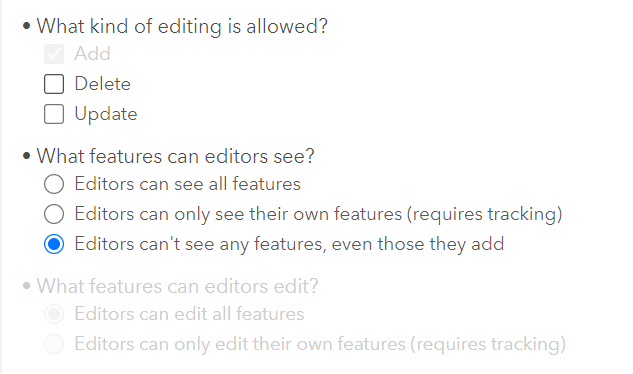
If your data is hosted on the arcgis data store in portal, you can then create a hosted layer view that shows the features to those that do need access. If your data is stored in a geodatabase, you can simply publish a second feature service with different permissions and sharing.
Hope this helps,
Andrew
1 -
Thanks for your comment, actually I followed what you suggested to get the result I want. However, those options are not accessible on the portal if the data are not hosted feature layer.
Our data are store in an enterprise GDB, so to access those options, I opened the portal manager URL, not on the portal URL.
0
Please sign in to leave a comment.
Comments
4 comments