Unable to run Workflow Unless Sharing is Public

I created a workflow and when running it in my HTML5 app, it fails to run with the error "You do not have permission to open this workflow." unless i set sharing to public (Organization doesn't work either).
I've also had this problem in the past with ArcGIS Online hosted workflows.
We are using Okta for single sign on to our HTML5 app, but our Portal is using domain authentication. Is that the problem? If so, what do I need to do? If not, what else could it be?
-

Yes, if you are signing into the viewer with Okta and your workflow is secured via your Portal (which is not talking to Okta) - that is the problem. An Okta security token wouldn't be valid in a Portal context. To consume private content (e.g. content that is not accessible publicly) from a Portal, you must sign into that Portal.
We discuss this in our GE docs here: Essentials Install - Choose a Method to Sign In to Manager (vertigisstudio.com): " If you want to use private Portal for ArcGIS content in your sites, you must configure sign-in using Portal for ArcGIS."
Fortunately, you can configure Okta as your identity provider (IDP) for SAML logins in ArcGIS Enterprise.
To resolve the problem you're seeing, you need to Configure Okta—Portal for ArcGIS | Documentation for ArcGIS Enterprise. Essentially, (pun intended) you'd be pointing Portal to Okta using SAML. From Essentials' standpoint we're just talking to a Portal, and that Portal just so happens to know about your Okta identities.
1 -
Thanks for confirming and providing a solution. I'll look into this and see if we can get Okta set up.
Do you happen to know if there are any issues that might arise with respect to ESRI roles and permissions (like creator, publisher, viewer) by using Okta?
0 -
BTW, would this also explain why GetLayer fails for services on our Portal?
Error is: No tokens matched, returning.
0 -
To answer your Qs:
"Do you happen to know if there are any issues that might arise with respect to ESRI roles and permissions (like creator, publisher, viewer) by using Okta?"
- This should work perfectly to my knowledge. Once set up using SAML, users show up as members. The below screenshot is from our test portal setup that is setup using SAML to connect to our ADFS, which functions as an IDP in the same way Okta would
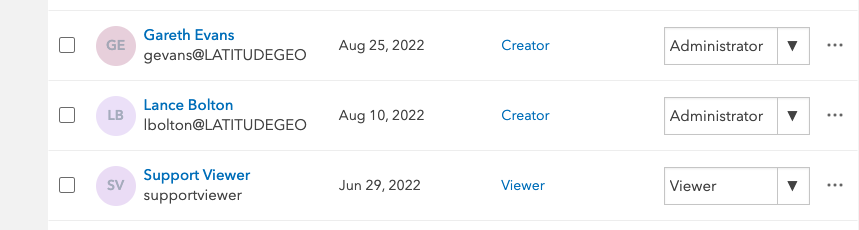
"would this also explain why GetLayer fails for services on our Portal?"
Yes, an Okta token is not the same thing as a portal token. If you make a request to portal and send it an Okta token it will not match anything that portal knows about without having configured it to speak to your Okta environment.
1 - This should work perfectly to my knowledge. Once set up using SAML, users show up as members. The below screenshot is from our test portal setup that is setup using SAML to connect to our ADFS, which functions as an IDP in the same way Okta would
Please sign in to leave a comment.
Comments
4 comments