Web Request not returning JSON output

I'm trying to perform a spatial join between a point layer and polygon layer to generate a dataset that will be used in a report, i.e. I want attributes from the polygon layer to be included on the point layer.
I couldn't find a specific activity for this so I implemented a Send Web Request activity. The URL for the web request is pointing at ../server/rest/services/System/SpatialAnalysisTools/GPServer/JoinFeatures/submitJob
The job gets raised but only returns the text parameter, which makes it difficult extract out the Job ID for doing a second Send Web Request to get the results of the spatial join.
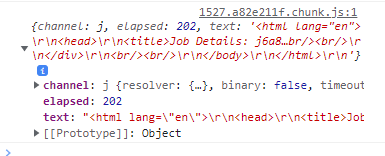
I specify in my input parameters that I want the output to be formatted as JSON.
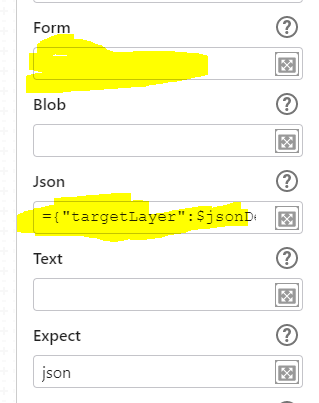
={"targetLayer":$jsonDefects.json, "joinLayer":$jsonParcels.json, "spatialRelationship":"Intersects", "joinOperation":"JoinOneToOne", "joinType":"LEFT", "f":"json"}
I can manually submit this job via the REST interface and I can see the results are correct.
Am I missing something?
-

How is the Expect input parameter on the Send Web Request activity configured?
https://docs.vertigisstudio.com/workflow/latest/help/Default.htm#wf5/help/activities/web-request.htm
Expect
Type: "blob" | "json" | "text" | String
The expected type of the response.
For example, if json is selected, the response will be parsed as JSON and the json output argument will be assigned.
1 -
Nico Burgerhart, I forgot to mention that I had tried setting Expect = json previously and it would only return 'undefined'. I don't have a lot of experience with the Send Web Request activity, so I tried a few other combinations of setting the input parameters as Form input or Json input, with and without the Expect parameter set. Each time it looked like the f parameter was being ignored and this was the clue.
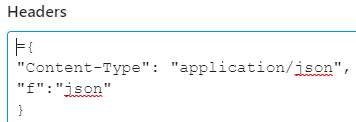
Perhaps it is obvious, but when I added "f":"json" to the Headers and have Expect = json, I got the result I was after.
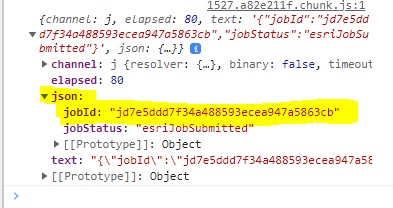
Thanks for the nudge in the right direction!
1
Please sign in to leave a comment.
Comments
2 comments