How to populate a form with database/context values

I am building an edit feature override workflow and use the context variable to create values for each field I want to make available for editing in a form.
How am I to properly populate the form with the values? Specifically, I am having trouble with the dropdownlist.
Currently, the form uses the Load event and the Set Form Element Property activity.
Note that my subworkflow to populate to dropdownlist options works fine, I just can't get the database/context value to be selected when I load the form to edit attributes.
What exactly is meant to go down here? Is there a selected index property I am missing?

EDIT: I found what I did wrong with the text area form element, but the drop down list is still not selecting the context value.
-

Hi Alex,
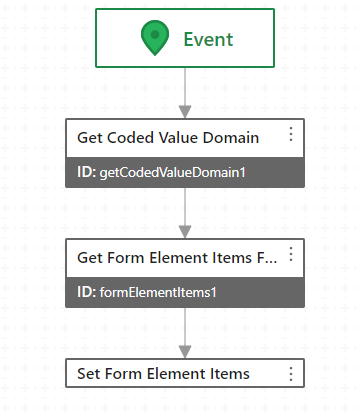
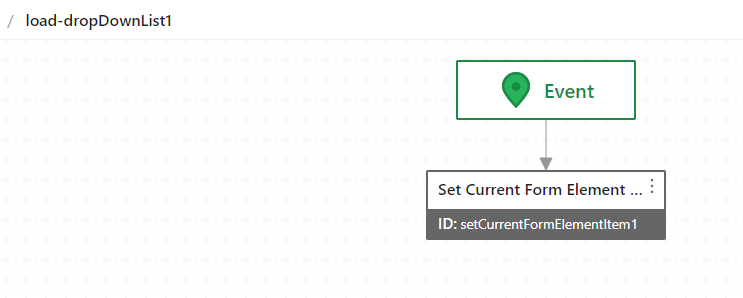
For the drop down list activities within the form, try using the 'Set Current Form Element Item' activity.
Populate Event:
Load Event:
 0
0 -
Oh great, thank you! That works now.
I could've found that reading the documentation more carefully, but I think I kept missing it because I was searching for activities named like "set form..." and missed the "set current form..."
0 -
No problem, that one also threw me for a loop when it was changed a few versions back.
0 -
Especially with drop down lists, there is a lot of overhead to loading the form, especially for editing.
Is there an option or best practice recommendation to improve performance when the form loads?
For example, I see a bunch of "blinking" of the form while all of the DDLs populate and then load the current value. I have a dozen DDLs in this form I am building right now, and some of our utilities have even more.
0 -
We have/had the same issue with a few of our workflows; From what I've discovered with lots of trial and error is that the only other option is to hard code the values into the DDL's within the form (which isn't an option for us). At one point I loaded all of the pick lists when the WF started, but that has it's own drawbacks (storing everything in memory)
Speaking from the development side, I'd much rather have the ability to add domain values in the geodatabase and stop/restart my web services to have them appear then to remember what forms in what workflows the domain is used in, our users also enjoy this functionality when they call in with additions to domain lists.
0
Please sign in to leave a comment.
Comments
5 comments