Drop down list validation

What is the recommended way to validate drop down list selections, since there is no validate event handler? Is it coming in a future release?
I have a required drop down list. When the user clicks Submit, with validation, this happens,

But they have to scroll back up to find that. I want to put in an Alert so the user isn't stuck wondering why clicking Submit is not working. The current behavior is not obvious enough for user experience.
For example, I have a numeric field for which I have the Alert in the element's validate event handler.
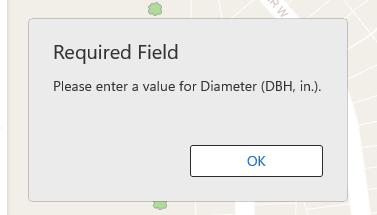
I tried putting the logic (If + Alert) to check that a value is selected in (1) the footer click event handler and (2) in the submit event handler, but I think those are too late in the form lifecycle to be proper validation.
Thanks!
-
Or is there a way to add that little red message to the footer at least, so it is in view of the user if a required field is not filled out?
0 -

Hi Alex St. John,
It sounds like the pain point here is how to draw attention to an invalid form element when submission fails. I think the intended behaviour here is for the form to scroll to show the invalid element. This might be implemented in some viewers but not others. Where are you running your workflow?
1 -
The intended scroll is not working in Mobile.
I just checked in Web and it does scroll, but I am mostly focused on Mobile, so I did not notice.
0 -
Alex St. John Thanks for confirming this. We will add this to Mobile. This is bug #203211, which you can quote when referring to this in future.
1
Please sign in to leave a comment.
Comments
4 comments