Grouping layers that have been added with "add layer to map"

Hello everyone,
we're using the activity "add layer to map" to add layers to our webmap on application startup:
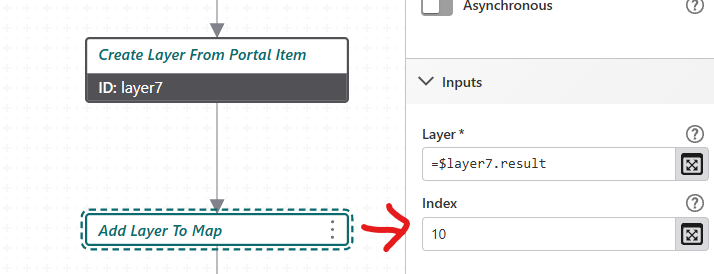
While adding layers at a certain position using “index” is already very helpful, it would be even better if we somehow could add these layers to already existing groups, or even create new layer groups to add those layers to.
Does anyone know of a way to do this?
-

We solved this by, generally speaking, “adding some body of a WebMap.”
Simply put, the steps were as follows:
1. Create a WebMap with the layers and group layers
2. Note the WebMap's portal item
3. Send an HTTP request to the portal's REST interface and the WebMap's portal item
4. Parse the JSON and extract the OperationalLayers
(see https://developers.arcgis.com/web-map-specification/ )
5. Run a command with “map.add-layers” and the JSON as a parameter
In practice, there were additional sub-steps, and it was very time-consuming to set up the workflow. Finally, this approach allowed entire WebMaps (no tables, no basemaps) to be dynamically added (at runtime) to the Studio Web App.
1 -
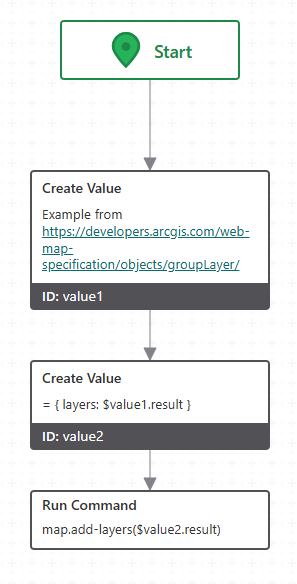
For a minimum you could also just create the JSON for the “map.add-layers” command.
The general JSON for a group layer construct can be found here:
https://developers.arcgis.com/web-map-specification/objects/groupLayer/
You can use that in a workflow like that:
 1
1 -
Thanks, Christian.
“map.add-layers” was our first approach, too, but unfortunately layers added this way don't honor pop-up settings.
0 -
We add layers using `map.addLayers`, and pop-ups are displayed as configured in the map service.
Try setting the “Use Esri Field Formatting” option in the map component.
See https://docs.vertigisstudio.com/webviewer/latest/admin-help/settings-map.html0 -
Apparently I've had “Use Esri Field Formatting” activated all the time. I just tested it again, and no, unfortunately the pop-up settings of the map services are not working when I use map.addlayers.
My understanding was the map.addlayers and the esri sdk “add layer to map” activities both offer different advantages/drawbacks and that there isn't a perfect solution that does everything.
It's interesting to hear that popups are working for you. Did you configure them in ArcGIS Pro?
0
Bitte melden Sie sich an, um einen Kommentar zu hinterlassen.
Kommentare
5 Kommentare