Add line break to title of components

Hi everyone,
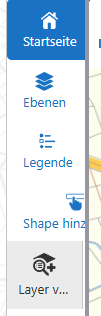
is it possible to add a line break in the title of a button or workflow in the taskbar? It is very unattractive when the text is cut off. There is also a difference in behavior: if I use a button in a panel, the icon remains centered above the title. If the title is long, the icon moves to the right and is also cut off. If I use a workflow in a taskbar, the icon remains on the left, but the text is cut off. It would be nice if you could force a line break for longer titles. Is that possible?
-
I've found a way to create a line break, at least in the toolbar.
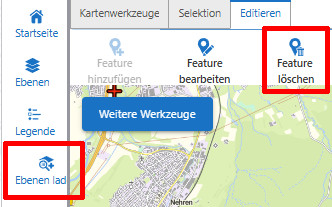
In addition to a “normal” space (to separate words), you can use one or more Unicode spaces—created by pressing ALT-255 (use the numeric keypad!)—to add spaces that VS Web still interprets as characters. This works at least in the toolbar, where the width of the items is limited and a line break is created if the width is greater. My “Feature löschen” tool would normally be displayed on a single line.
Unfortunately, it doesn’t work with buttons whose width cannot be limited (see the left side of my project - “Ebenen laden”).
 1
1
Bitte melden Sie sich an, um einen Kommentar zu hinterlassen.
Kommentare
1 Kommentar