Option to enable/disable the loading animation bar in VertiGIS Studio Web

Client would like the ability to disable the thin blue animation loading bar at the top of the map window in the Web viewer and use another method to notify the user that the map is loading. Can the loading icons be configured so they can choose which ones they want displayed?
-

For anyone that wants to just disable this progress bar please follow the steps below.
Create a new workflow with an Inject CSS tool in it e.g.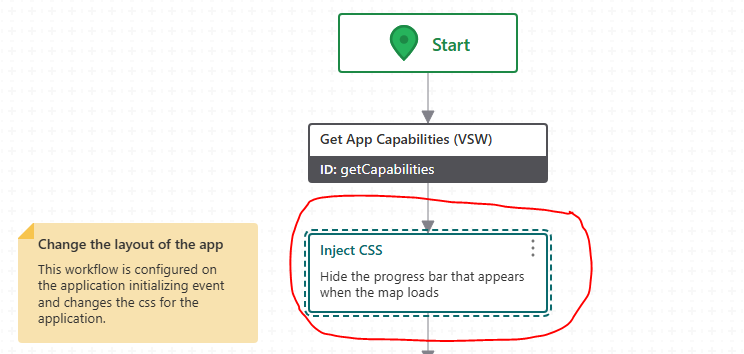
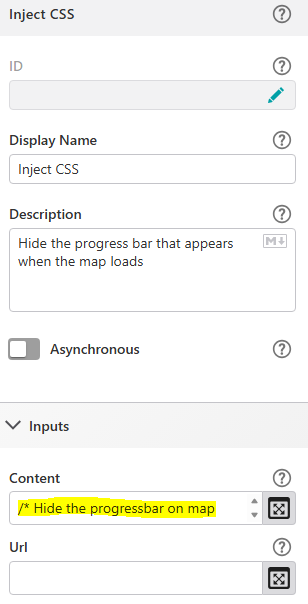
In the content of the Inject CSS enter the following CSS:
/* Hide the progressbar on map loading */.MuiLinearProgress-root {display: none !important;visibility: hidden !important;height: 0 !important;}/* Hide the progressbar animation (blue line at top) on map loading */.MuiLinearProgress-bar {display: none !important;visibility: hidden !important;height: 0 !important;}Save the workflow.
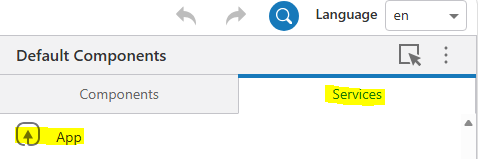
In VertiGIS Web Studio click on Services, then App.
Under Events, Application Initializing, choose the workflow you just saved.
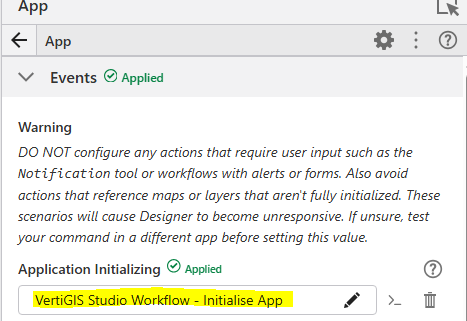
Save the App.
This should stop the progress bar appearing when the Web App loads.0
Bitte melden Sie sich an, um einen Kommentar zu hinterlassen.
Kommentare
1 Kommentar