Measurement tools

We're just starting to play around with VS Web, and one of my users noticed some restrictive behavior with the measure tools. It seem that if you try to move your cursor while a measure tool is active inside of the bounding area for tools in the Top Start section, the app won't let you. Interestingly, if you go to the extreme edge of the map so that you're outside of the Top Start area (image below for context), it does work, so it certainly seems like the tools won't let you move the cursor or create vertices inside that area.
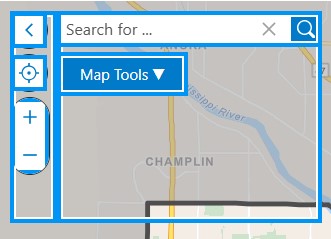
The behavior is not the same with Identify tools, which let you draw rectangles within and even completely over the Top Start area, so I'm hoping this is just some buggy behavior that isn't too difficult to resolve in a future release?
Bitte melden Sie sich an, um einen Kommentar zu hinterlassen.
Kommentare
0 Kommentare