Hide Measurement labels in Edit Markup mode

It would be great if we could hide the measurements on a markup while in Edit Markup mode. They overlap and cover the round nodes that separate line segments, making it hard to see the circles. A toggle in the little editing window to either hide them or move them above or below the nodes would be helpful.
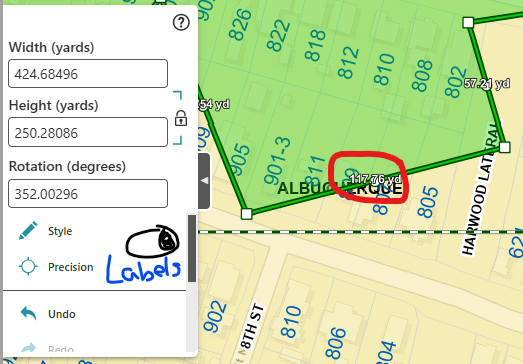
-

Hi Jessica,
You may find a solution in the following article, which deals with how markups and measurements can be deleted separately. You may be able to insert the following command when starting the edit markup tool:
{
“name": ‘map.clear-markup’,
“arguments": {
“collection": ”vgs-measurement-labels”
}The labels are then of course completely deleted and not moved.
0 -

I hope some label formatting options for measurements can be implemented. There are cases when users are only interested in the area, and the length labels only add clutter.
1
Bitte melden Sie sich an, um einen Kommentar zu hinterlassen.
Kommentare
2 Kommentare