Restrict which layers appear in popups

Happy Friday,
Does anyone know how to get VSW to display a popup only for layers that I've configured popups for in Esri's Map Viewer, without disabling the layer from other identify tasks?
Below is how I have my popup set up, but of course, there is no actual “popup” I've found in VSW; you need to configure it this way, and it has to be a results component.
Well, the issue I see with this is that I have most of the layer popups turned off in the web map I configured for this VWS app, but because populating a popup is a tasks.identify operation, even if popups are turned off, if tasks.identify intersects that non-popup-configured layer, it returns the feature and all its fields anyway. I would like to restrict this, but the only way I know is by turning identify off for a layer. But I have an identify toolbar tool in the app as well, which I want to be able to identify any layer.

Does anybody have any neat trick that isn't in the VSW documentation? Thanks!
- Jack C
-

Hey Jack Charde from what I know, when a specific layer is identified it will respect the popup configuration from the web map (that you configured in the Esri Map Viewer) so I would already expect to see that behaviour.
That being said, it sounds like you have two different identify tools - that one you mentioned in the toolbar and the one you are concerned with in this context. In that case, you may be able to change the command chain for the specific tool you are describing. It might be that you could do something like results.display-details rather than the generic results.display.
1 -
Hey Gareth,
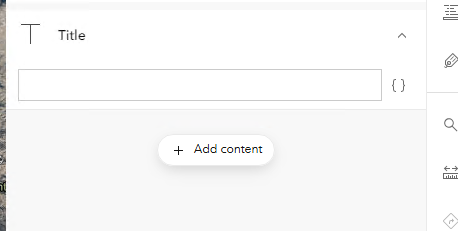
Well, this doesn't seem to be happening. Below are some images of the issue. The first image is how I have my bus stops layer's popup configured in Map Viewer, which is just the title set to the stop name. No fields list. The 2nd image is what shows in the feature-details component with my VSW popup for that same bus stops layer.
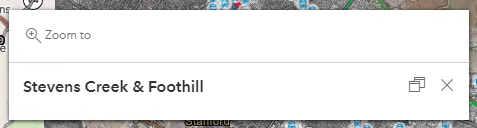
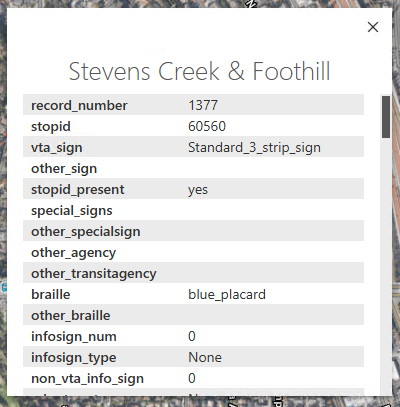
The Map component's Map Clicked event already does have a custom command chain calling the Model URI of the feature-details component (from the image in my original post) as an argument to feature.display-details. So, it's not a concern that both details components are opening, I've been able to isolate that in the map event. It's just that it's not respecting my popup config in Map Viewer. It's even happening for layers whose popups I've turned off in Map Viewer. The results still show in the popup.
I do have another app where I got rid of a layer's field list in its popup in Map Viewer, and replaced it with a text box that I copied a table into and that appears properly in the app. But for the most part, VSW is not respecting my popup configurations in Map Viewer.
0 -
Something I noticed:
In Map Viewer, I have a layer called Bus Stops. This layer should have a popup, and the popup should only have a title. It should not have any other added popup contents (no field list, table, chart, or image). If I have only the title set, and then save the web map and open my VSW app that uses this map, clicking on the map still shows a full field list for that layer. See images below for this.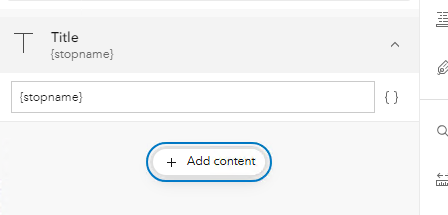

Now, if I go into the Results service in VSW, I see the following for the Detail View Settings:

If I remove Popup Content, the popup window only displays the title of the layer. However, changing this also removes the popup content from all other layers whose popups (configured in Map Viewer) I want to display properly in the VSW popup window. This is undesirable.
Now, if I go back to Map Viewer and update the popup for Bus Stops so that there is no title and the stop name field is referenced in a Text popup content item, in VSW, I get the title at the top of the result details, and below, since there is a Text block from Map Viewer, I see the stop name again:
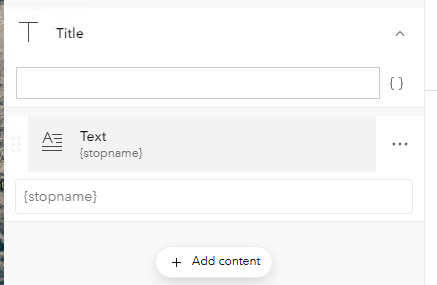
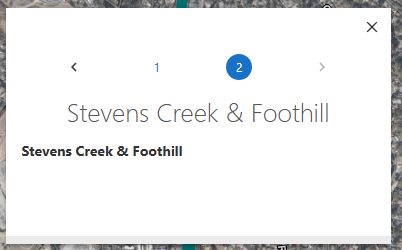
This is also undesirable, as I don't want the stop name repeated twice. Now, if I go back into Map Viewer, and remove everything from the popup, but keep it enabled, in VSW it still puts a title and the entire field list in the popup:
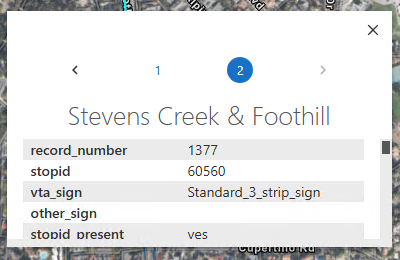
I am at a loss for how to get around this.
0 -
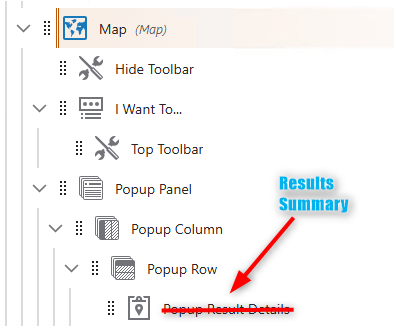
Providing an update on this. I was able to jog my brain into compliance and realized that for configuring popups, you should be using a Result Summary component, not Result Details. This is because the summary component is tied to a layer extension setting within the Map component (Summary Popup Content section within the layer or sublayer extension) that allows you to select what should be visible from the popup (configured in Map Viewer) and displayed in the VSW popup. Using Result Details will return much more because it gives you all of the details about the returned feature, and this was why I was seeing all the fields listed in my popup, when I only wanted some info.
 0
0 -

Hello.
I have a similar issue.
However, in my case I don't want the pop to show up at all. I have a layer with popup disabled in the web map, but in the VertiGIS viewer when a user clicks on the layer in the map the popup info will still show up.
In order to turn off popup in the VertiGIS viewer, I have to disable ‘identify’ on the layer. But if I disable identify the layer will not be available in the identify results. It seems like in the VertiGIS viewer ‘identify’ controls both popup (map click) and identify results. And the VertiGIS viewer also seems to ignore the ‘popup disabled’ setting on the layer in the web map.
In Geocortex Essentials there was separate control for ‘map tips’ (popup) and ‘enable identify’.
It's possible that there is similar setting in the VertiGIS viewer, or just a different way to solve this issue. But I cannot find any solution.
0 -
Hey Nataliya Lys,
Do you have anything configured that targets the “Popup” slot in your Map component, such as any of the results components? If so, that might be one reason your popup still appears when identifying. Otherwise, I believe identify creates a result set that will target every result component, unless you write a custom command chain that specifies what result component to target.
- Jack C.
0
Bitte melden Sie sich an, um einen Kommentar zu hinterlassen.
Kommentare
6 Kommentare