Change orientation and presentation of related records (i.e. data links)

Has anyone tried change the orientation of the related related in VS Web? We display this information in a left side panel, but the default orientation is horizontal, and we would like to change the display to vertical. The default in Geocortex HTML5 Viewer is a vertical orientation.
Our layer has 7 x data links and to display this much information horizontally in the default table makes the information almost unusable. (See the image below). The user has to scroll through an embedded table and then click into each row. Way too click heavy.
We're testing a fix using Arcade expressions in a pop-up in our Portal web map, but this fix is also proving challenging.
VS Default and Arcade Test examples:
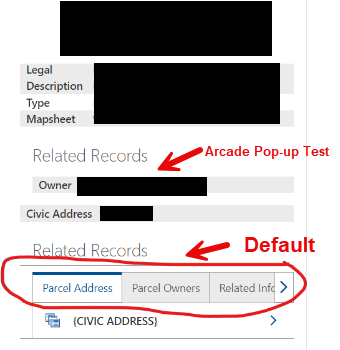
Hoping VertiGIS will add this to a future enhancement. (I'll add this to the ideas area as well).
-

We have the exact same issue at Sutherland Shire Council. The presentation of the data links (related records) is unusable. Please prioritise this presentation issue VertiGIS! Even if its a command so we can open up all the related records in the table view that would be a step better.
3 -

Hi Vanessa and Belinda,
Thank you for highlighting this issue and sharing your feedback. I understand how the default horizontal orientation for related records in VS Web can be challenging, especially with larger datasets like your seven data links.
Here’s how we can proceed:
-
Arcade Workaround:
- If you’re facing challenges with the Arcade expressions, feel free to share details. I’m happy to help refine your approach or escalate for further support.
-
Enhancement Request:
- A vertical orientation or a command to open all related records in a table view are great suggestions. I’ll share this feedback with our product team, and if you haven’t already, I encourage you to log it in the VertiGIS Ideas area.
-
Interim Solutions:
- If additional configuration options could help in the short term, let me know. We can explore possible adjustments.
If you have more context or examples to highlight the broader impact, sharing them will strengthen the case for prioritizing this enhancement.
Thank you again for your input—I’m here to help!
0 -
Arcade Workaround:
-

Hello,
Thanks for the reply
I believe the Enhancement Request is our way forward. As far as Arcade goes we have been working with ESRI and it is only a solution if all the data is in a single geodata base which it is not.
We are planning for our VertiGIS Roll out in May, and have tabled this hoping for an enhancement to be available at some point soon. The other solution we have come up with is to make a cached table with all the relates in columns and while this displays nicely it is a lot of work to keep the table up to date and causes time delays before edits are visible to end users.
Unfortunately at this it appears to be an area where VertiGIS has simply not yet reached feature parity with Geocortex.0 -
@... - I have posted an idea with some screen capture examples of our setup here https://support.vertigis.com/hc/en-us/community/posts/23026751620498-Allow-related-tables-ie-Data-Links-to-display-in-the-table-view-rather-than-in-the-result-details-results-list
Is there any current options to do anything like this? Other users have also posted similar questions like https://support.vertigis.com/hc/en-us/community/posts/21767456126354-Position-Results-Details-Related-Tables-in-Panel-at-Bottom-of-Display?page=1#community_comment_22167961226514
1 -

I wonder if you can do this via a workflow? Perhaps, add a feature action to the result details interface to run the WF. It would query the datalink data source(s) and set the display mode to table and then use the show results activity. Not sure if it can handle multiple tables with tabs though.
What do you think @...?
0 -
Hi Zorba Conlen
Your idea of using a workflow to achieve this is on the right track. A feature action tied to the result details interface could indeed launch a workflow to query related records from the datalink data source(s). You can configure the
Show Resultsactivity to display them in a table view.However, handling multiple tables with tabs might require some custom scripting. While
Show Resultssupports displaying a single table, you’d need to dynamically manage tabs or sections to represent multiple tables. This could be achieved using a combination of Workflow logic and a custom component.Another piece of info worth considering is that you could have multiple Results Tables and target them using a results.display command. I have an example workflow specific to that here: Example - Show Results in Specific Table - VSWF
0 -
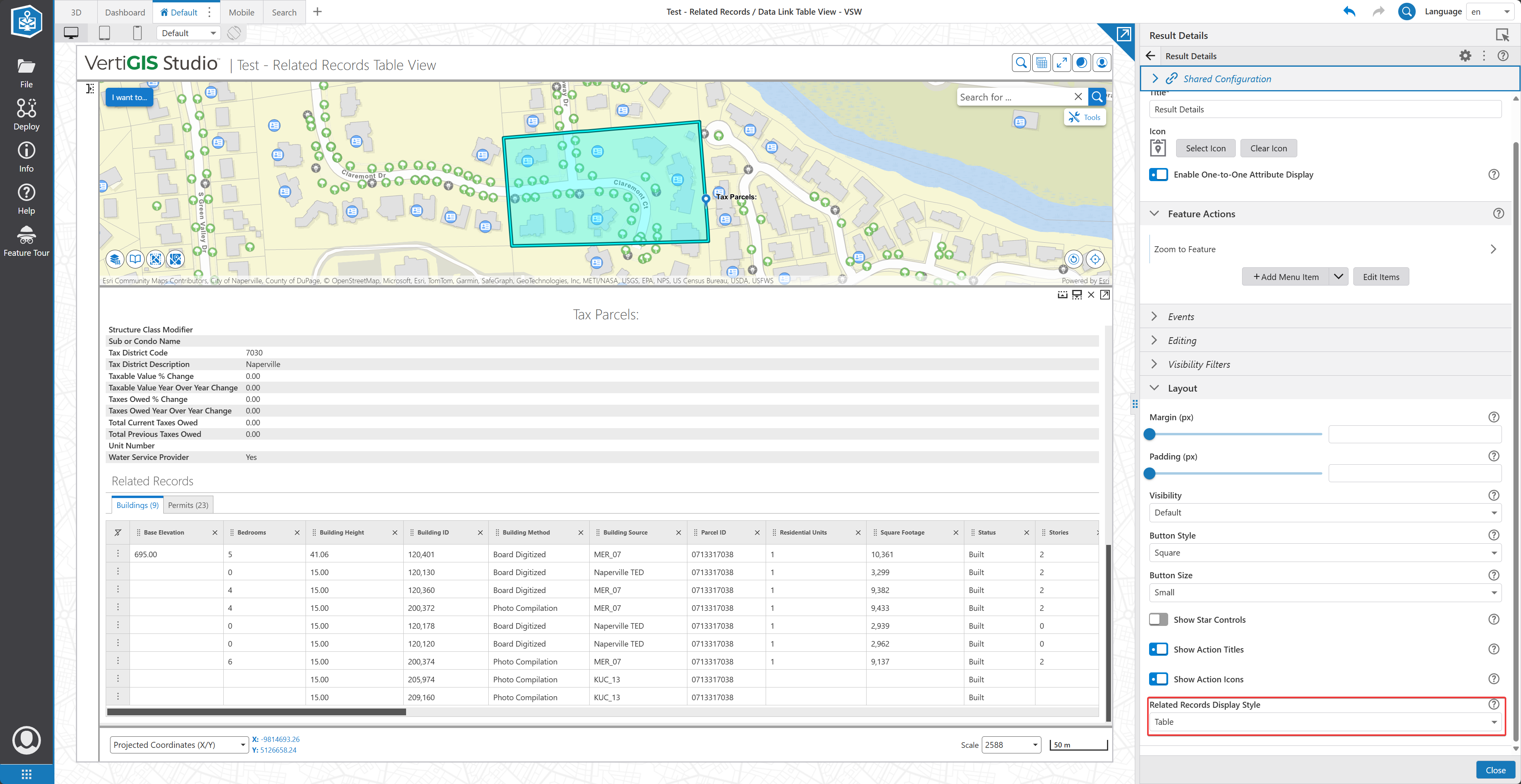
I also noted that there is already a configuration option within the Results Details component for the Related Records Display Style, either Preview or Table. If you put your Results Details in a panel that is wider, this could be useful though I noted that the specific feature details are not really designed for this sort of width. It looks like this in my test:
 0
0 -
Ok, thanks for the info. Regarding the related records display style, it's closer to what I'd like, but it is more suited to a wide panel, which does not really fit for my app. Good to know, however, as I hadn't noticed that before.
On the workflow front, seems there are some possibilities. That sample you provided looks helpful. I assume there's an input parameter, indicating which result table to target?
0 -
Is there any way to have a workflow launch on results details shown and then display content directly below the normal results content? I think this could solve a lot of issues as it would allow any sort of formatting to be done in the workflow via HTML tags.
So far the only options I have found is feature actions, but I don't want to make users click another button, and then the datalinks are workflows but they expect a specific return type as opposed to a formatted result.
0
Bitte melden Sie sich an, um einen Kommentar zu hinterlassen.
Kommentare
9 Kommentare