Custom map-context menu

Hello,
I am trying to make a better context menu for the map by replacing the default context menu for the map with a Row-component that is set to the Slot: Context menu, which has a Toolbar-component in it.
The thought is that the toolbar is better at showing nested menus than the default context menu that is available in the map-component.
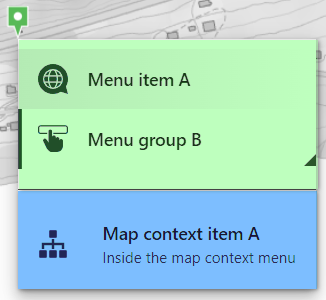
The menu items that is marked in green comes from my custom context menu, and the menu item in blue comes from the maps default context menu.
The composite context menu with both native context menu items, and the custom context menu items
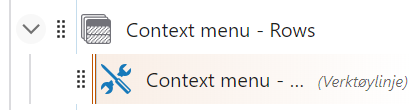
The layout setup for my custom context menu
This is all well and good, however when I try to click on the menu items from the custom context menu, the “context”-object when I run a GetWorkflowInputs is empty. When I do this for the blue context menu item however, the “context”-object is returned with a point and all its bells and whistles.
Is there a way to make sure that I can send the location of the right click in to the green menu items aswell? Stuck in a rut here sadly.
Kind regards
Tor R Børset
-

Hey Tor
I like where you are going with this, and I wanted to revisit your original problem that you are looking to solve. I infer from your mention of nested menus that this is about having a fly-out style menu for menu items that have multiple levels, is that right? I didn't see a nested menu in that screenshot so I wanted to confirm the use case. I am picturing something like the Windows nested right-click menu, is this what you have in mind?

In terms of why you are not seeing the map geometry in your workflow input, I think this is because that, by design, the toolbar component does not get/send that (see these docs: https://docs.vertigisstudio.com/webviewer/latest/admin-help/use-the-menu-context-as-a-work.html) - I think that to get the specific functionality you are looking for with that toolbar component you would probably have to implement a custom component, which from my view would be a bit of a pain.Anyways, I think it would help to understand the initial use case/problem you are looking to solve and we can potentially suggest alternative approaches.
0 -
Hi Gareth! Thanks for the reply.
Yeah thats right, a fly out nested menu would be perfect, and a very good addition to the context menu in the map. One for Santas list I guess.

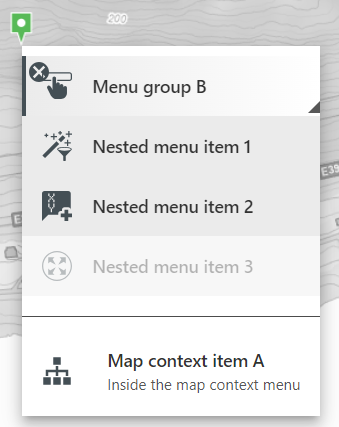
What I was thinking of as a compromise was using a style of menu like the one i am showing here. Using sub-menus as the nested-part of my context menu. I was hoping that seeing as the toolbar was a part of a element that is connected to the context menu of the map, it would also recieve the context object. However I can see that this might not be the case.
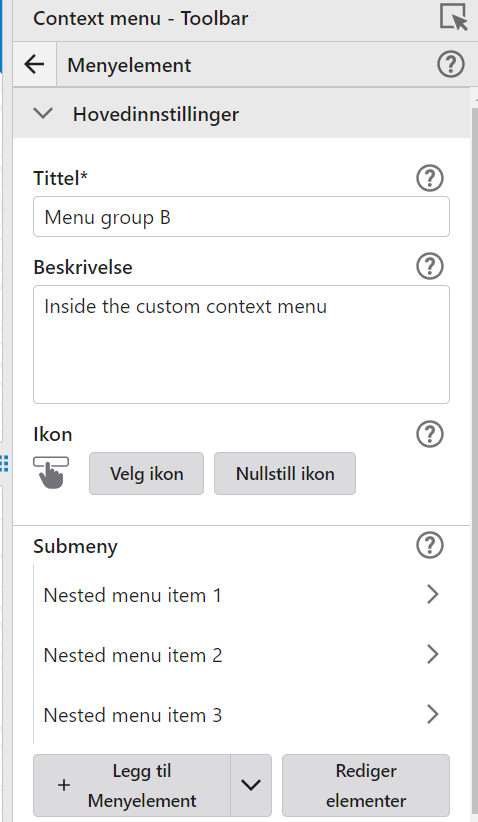
Here is the view of Menu Group B in the designer ( pardon the norwegian):
Is there any way of adding an event-listener for the right click in the map and run a quick workflow that store the geometry of the right click location in a temporary object in the application data so that the geom can be reached from other workflows?
Is there any possibillity to regisiter a view.on("click", event => {return event}) event that can be published / registered as an app-event into the vertigis app? I've managed to register the mapview-event by using the Evaluate Expression that returns the remove-handler for the “click” event on the mapview. However I am struggling to find out how I can get this mapview-event to bubble up to the vertigis app such that the app can register the click in the map and get the event object.
Seeing as the mapview's on("click") event contains information about the click-events mapPoint and which button was clicked, it would be useful. Then I could store the mapPoint in the application data, which would be accessible to workflows in the context menu toolbar
0
Bitte melden Sie sich an, um einen Kommentar zu hinterlassen.
Kommentare
2 Kommentare