Map Clicked Event - Pass geometry to custom workflow

Hello, I am trying to add a custom workflow to the “Map Clicked” Event in my map in VertiGIS Studio Web App and cannot determine what to put in the “Input Arguments” JSON so that my workflow can use the geometry of where the user clicked on the map. Is there any documentation out there on what the syntax would be so my workflow knows the geometry of the point clicked by the user?

-
Offizieller Kommentar

Hi Tom, and everyone else!
In VertiGIS Studio Web, some menus pass context directly to the running command, like in your case with a Workflow. This is why operations like
task.identifycan function without needing specific arguments.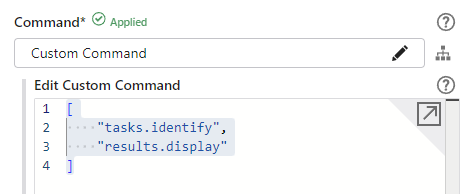
If you explore the Workflow Inputs in VertiGIS Studio Web, you'll notice an argument labeled "context". This contains the relevant information based on the menu action that triggered the Workflow. For example, when a user clicks on the map, both the geometry and map extension information are passed as arguments to the command. This allows you to access the geometry via the following Workflow syntax:
$getWorkflowInputs1.inputs.context.geometry
For a practical example, you can explore this directly within VertiGIS Studio Web: click into the map command, select to create a new workflow, and choose the “Basic - Get Map Context from User Input” template. This will show you how context is managed in real time.

For a more detailed explanation on how context works in various scenarios, you can check out the official documentation here: Use the Menu Context in VertiGIS Studio Web
I hope this helps clarify how context is managed across different commands!
Feel free to reach out with more questions!
-

Hi Tom,
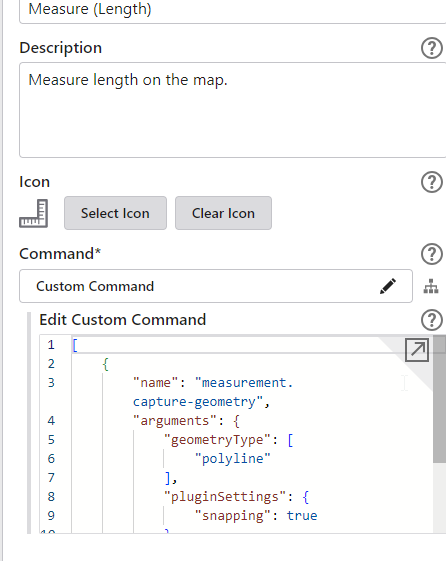
I don't have a direct answer, but I've used other tools as a way of sometimes getting an idea of what to use. eg. the measurement tool has the commands listed as such.
From here, I'd then search the Commands and Operations page to see if anything fits the bill with what you're trying to do..
https://developers.vertigisstudio.com/docs/web/api-commands-operations
hope that helps?
 1
1 -
Victor, Your explanation of the context argument is what I needed. I have it all working properly now. Thank You!
1 -

Victor to the rescue, 10/10! 🙌
0
Bitte melden Sie sich an, um einen Kommentar zu hinterlassen.
Kommentare
4 Kommentare