WMS item cannot be added via "Add layer from an Esri portal"

We're experiencing an issue with the "Add layer from an Esri portal" command - it seems like WMS layers cannot be added to the map that way. We have tested WMS services (from various servers) that are items in the portal and work as expected both in Map Viewer and in VertiGIS Web if they are part of the web map that the app is using from the start. When we however try to add the same services to the app using "Add layer from an Esri portal", they do not draw in the map.
Upon examining the console we found one difference in the request URL of the WMS: in Map Viewer the format parameter is "image/png", while in VGS Web it is "png" as shown below:
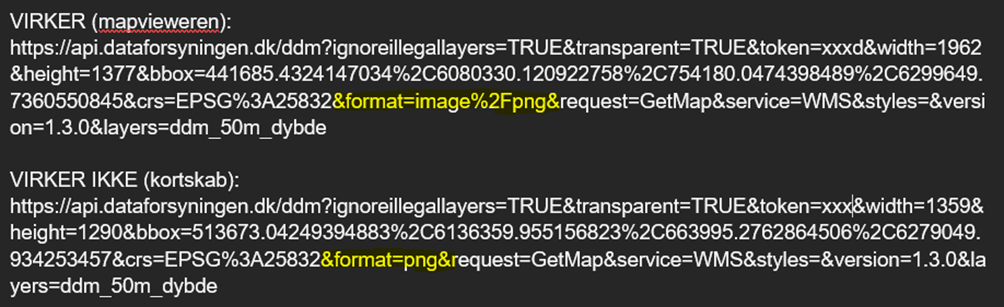
These changed URLs return the same type of error (although formulated a bit differently depending on the server that hosts the WMS):


This is an issue that our customers experience and we can reproduce. The customers consider it critical, as it means the only way a WMS can be viewed in the app is for it to be part of the original map - which defies the purpose of the "Add layer from an Esri portal" function (as the app users use different layers and it kills app performance if all the relevant layers should be in the map from the start).
Has anyone experienced anything similar/found a workaround to this?
-

Any news regarding this problem, that I'm also having.
It's very annoying and forces us to keep the WMS layers in the webmap instead of using the Add layer… feature
0 -

We are experiencing the same and another related problem with WMS layers. Users cannot load a WMS using the Add Layer from AGOL tool. The WMS appears in the layer list but layers do not render in the map window.
When saving a Project json file containing WMS files the WMSs appear in the layer list but are unusable (visibility control for layers no longer works). We have one WMS which just shows the Group level in the layer list and not the layers within it. Another WMS shows the layer list with visibility of layers as when the project was saved but the layers marked as visible in the list do not render in the map window.
1 -

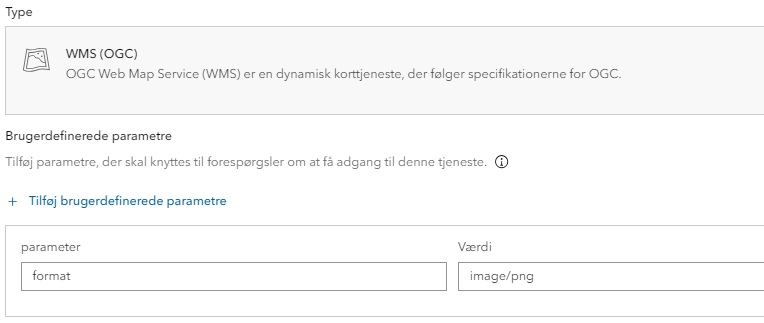
When importing the WMS to ArcGIS Portal try to set the userparameter “format” to “image/png”. This forces VertiGIS to use the correct format. This is, however, still a bug in my opinion.
I am still experiencing the same issues as Peter Jackson. Especially WMS-services from our Geoserver. Other WMS-services are not having the same issues in my experience.
Are you using Geoserver to host the WMS-services Peter?
1 -

Is there any news on this?
0 -
We need a solution to this long standing problem.
1 -

We have seen this issue too.
0
Bitte melden Sie sich an, um einen Kommentar zu hinterlassen.
Kommentare
6 Kommentare