Customize back arrow on panel in Web

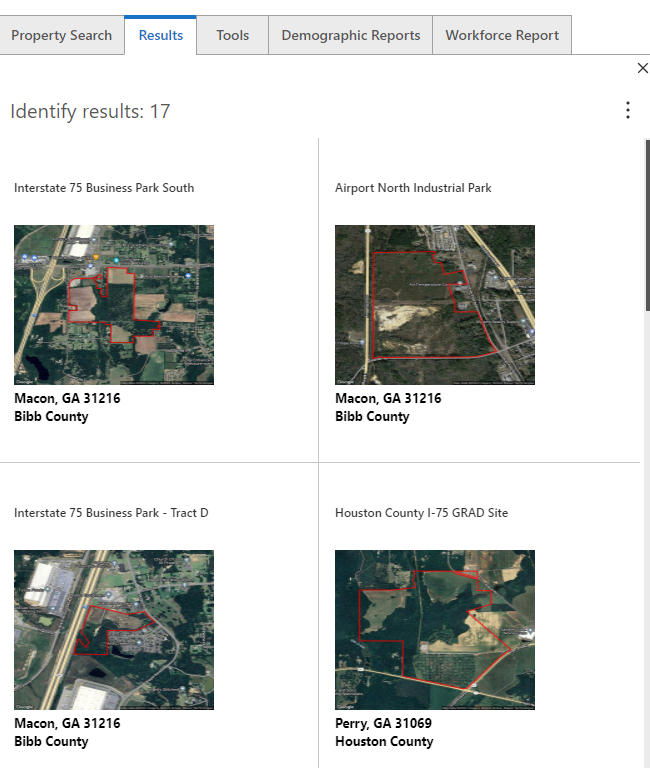
I have a Web application that returns results of a search as a results list in a panel. When the user clicks one feature in the results list, it then goes into the results detail:
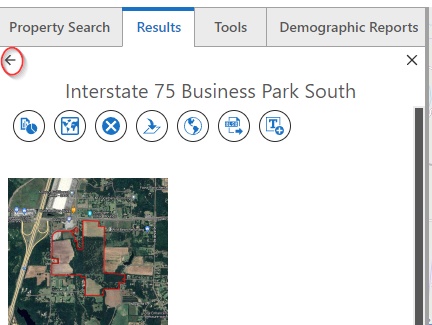
In my specific use case, the back button is small and hard to see leaving the user unsure what to do next if they don't see the back button. Here is an example from another vendor that makes it clearer for the user:
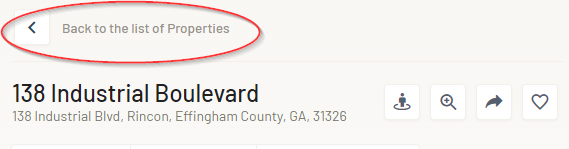
It would be great to be able to customize the back arrow to allow the administrator to change the size and give the option to provide text next to the arrow.
-

+1 to this idea.
I've tested a workaround in CSS that seems to work OK at the moment. It might assist until more customisation options are available through the web designer.
If you have a startup workflow with the inject CSS element, the below code will add text next to the arrow and increase the size of the arrow.
/*Add text to the back arrow.*/
button.MuiButtonBase-root.MuiIconButton-root.MuiIconButton-sizeSmall.arrow-back-button.gxw-ltr-18r52qk::after {
content: "Back to previous panel";
font-size: large;
font-style: italic;
position: relative;
padding: 5px;
}/* Change back arrow size */
svg.MuiSvgIcon-root.MuiSvgIcon-fontSizeInherit.gxw-ltr-1qk6fot {
font-size: large;
}
But it would be great if additional UI customisation options were available through the web designer.
0 -
Thanks so much for this code, it worked great! I was wondering if it was possible to inject CSS to do this but wasn't sure how to add that. Here is what it looks like now in my application:
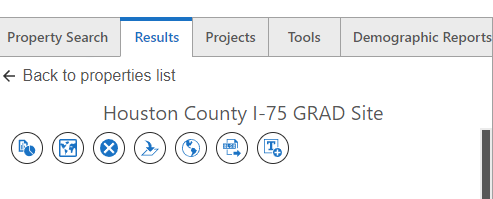
I tweaked the CSS a little bit to change the font size and color, here is what I ended up using:
/*Add text to the back arrow.*/
button.MuiButtonBase-root.MuiIconButton-root.MuiIconButton-sizeSmall.arrow-back-button.gxw-ltr-10ya35p::after {
content: "Back to properties list";
font-size: medium;
font-style: normal;
color: #555555;
position: relative;
padding: 5px;
}/* Change back arrow size */
svg.MuiSvgIcon-root.MuiSvgIcon-fontSizeInherit.gxw-ltr-1qk6fot {
font-size: large;
}Thanks again for this, this will work very well in my application, really appreciate your help!
0
Bitte melden Sie sich an, um einen Kommentar zu hinterlassen.
Kommentare
2 Kommentare