Access Configuration in Web

I inherited a vs web app from a coworker who had just copied the config from another department. Although some things were deleted, I still see a lot of this detritus when I deploy. I know there is a way to view the configuration in web - I thought it was Fsomething but I cannot remember how to get to that interface. Post script: is this the best way to get rid of this stuff?
-

Hi Bobbi!
'Ctrl + Shift + e' in the Designer will bring up the app configuration JSON.
You can also access the JSON through either VertiGIS Studio Item Manager or AGOL Assistant.
I would say in general it's best to remove unwanted configuration from within the Designer UI, however it's definitely possible (and sometimes necessary) to manipulate the configuration directly using the methods mentioned above.
0 -
Thank you! I will tread carefully… and have a backup.
0 -

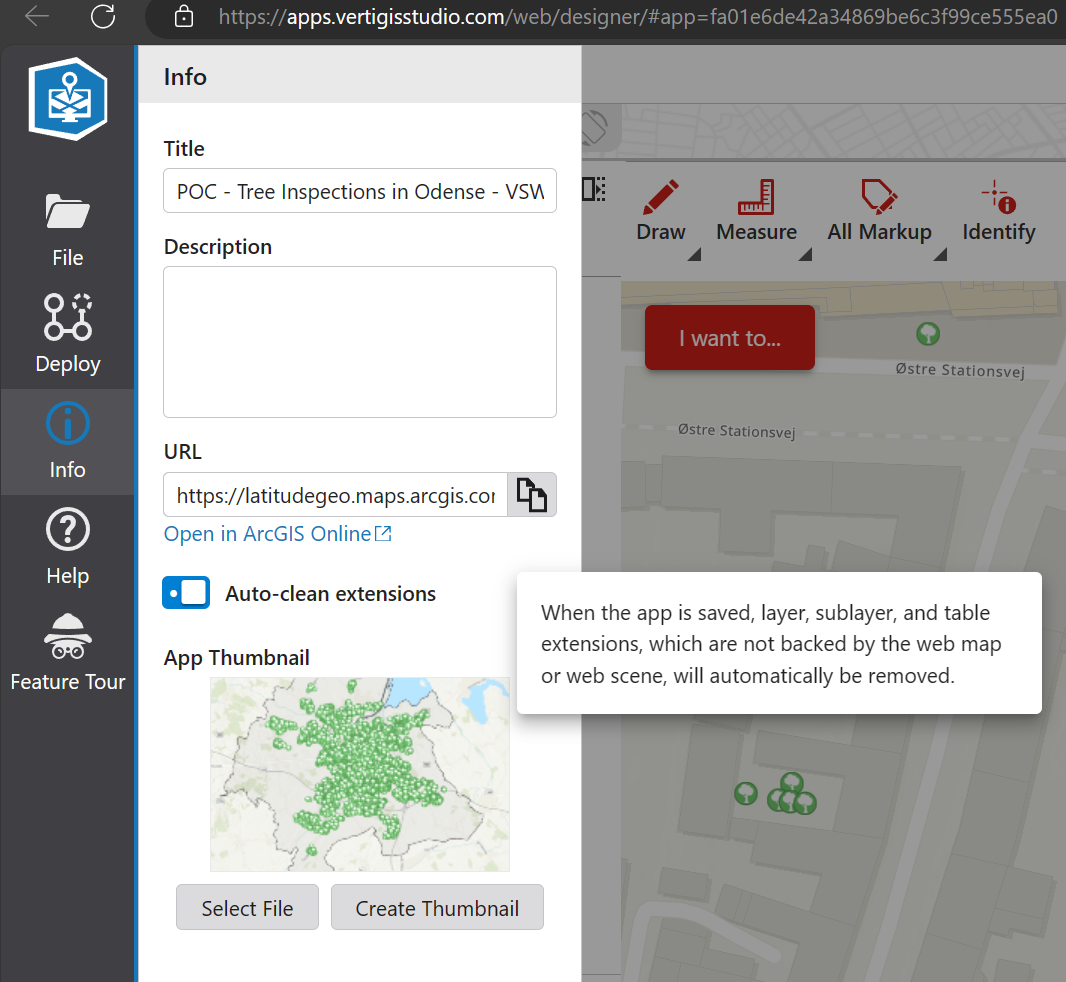
Before manual removal, consider using the 'auto-clean extensions' setting in the Designer, found under the info menu. This is our built-in feature to help clean up these unused extensions and detritus for you.
 0
0
Bitte melden Sie sich an, um einen Kommentar zu hinterlassen.
Kommentare
3 Kommentare