Remove Basemap Picker Selection

Not sure, but I'm wondering if there has to be at least one option in the Basemap Picker and that is why Topographic does not have the Delete icon. I would like to make one of the other three Basemaps the default and delete Topographic, but I can not figure out how. Any help would be greatly appreciated.
Thank you.
keith

-

Hi Keith!
I think the top map is the one that is the picked default basemap in your linked ESRI map, from what I can tell. You can adjust this then by changing your basemap in your ESRI map.
0 -

I'll jump on this thread also, as I'm having similar issues with the basemap picker.
I'm trying to remove the ‘default’ basemap in the picker, or at the very least get access to the same functionality that the other ‘non-default’ basemaps have. ie. being able to configure them.
This is very frustrating, as I've configured the other basemap entries to turn off their equivalent layer in the layerlist - yes, I'm trying to get both Layer list basemaps, and basemap picker to work in sync, as on the rare occasion we need to overlay tile cache imagery (aerials on top of tiles and vice versa). I've got this working with a custom-command and or workflow approach, but we like the extra information and links the basemap picker gives, but just cant work out why on earth the default basemap can't be tweaked?? It has zero options against it.
I've even added the same default basemap back into this tool as a custom basemap and have that working nicely, but I then can't hide/remove the default, which is essentially 1. now duplicated, and 2. dumb and just sits there doing nothing interactive :(
custom basemap - can add Events - ie. interact also with the layer list
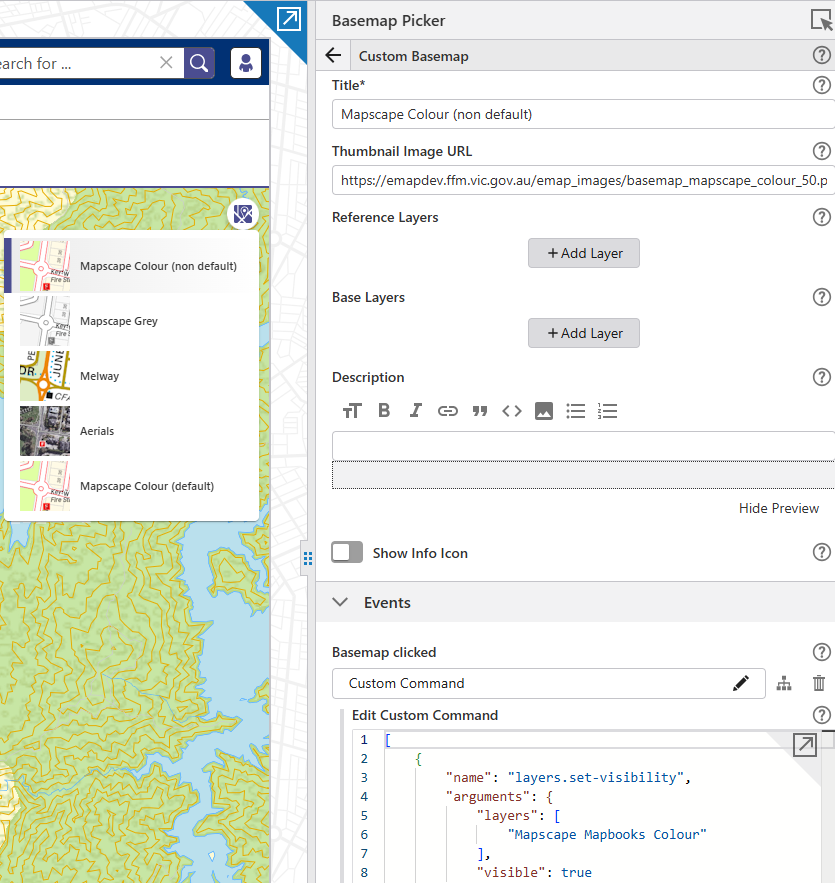
default basemap - no options urrrrgh !!
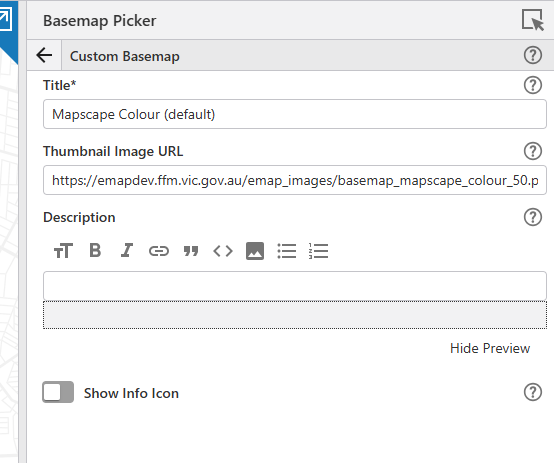
Any help appreciated as always
0
Bitte melden Sie sich an, um einen Kommentar zu hinterlassen.
Kommentare
2 Kommentare