Unable to deploy VS Web app (SaaS) that uses on-prem VS report

I have no trouble deploying a VS Web app (SaaS) from Dev to Prod when the included VS report was created in the SaaS environment, but deployment fails, and I get an error message, when deploying the same app where the SaaS report has been swapped out for an on-prem report.
On-prem VS Reporting is what I would like to continue using for the time being. The app I am developing is to be accessed by the public. The version of on-prem VS Reporting is 5.22.
According to the error message, the on-prem report is causing a permissions problem and it is not apparent how to fix this. I'm wondering if I am missing something in my setup of Web or Reporting, or if on-prem capabilities are not meant to be deployed with SaaS VS Web apps.
The error message I receive is below.

-

Hey Lee Brannon it's OK to mix & match SaaS & on-prem deployment, though keep in mind identities and the authentication system used. I think the issue here is the identity used to sign in, and the sharing level of the on-prem report.
If you change the Report app item to be shared with everyone (public), can you then deploy?
0 -
The report app item was shared with Everyone (and still is) when I was testing the deployment. That's why I am really confused about what else I need to open up permissions on.
But glad to know that this scenario should work.
0 -
Hey Lee
Re-reading that error, I suspect the issue is actually within the Deployment Stages configuration. I’d re-check what you’ve got in there. From what I can tell you’re looking to deploy the prod deployment to your AGOL org right? It could be the app item set to allow sign in there is inaccessible or not there anymore.0 -
Gareth, I'm not clear on what you mean by "the app item set to allow sign in there is inaccessible or not there anymore".
Would you mind clarifying that for me.
0 -
Hi Lee Brannon
I'm referring to the Change Deployment Strategy screen, in the Deploy menu: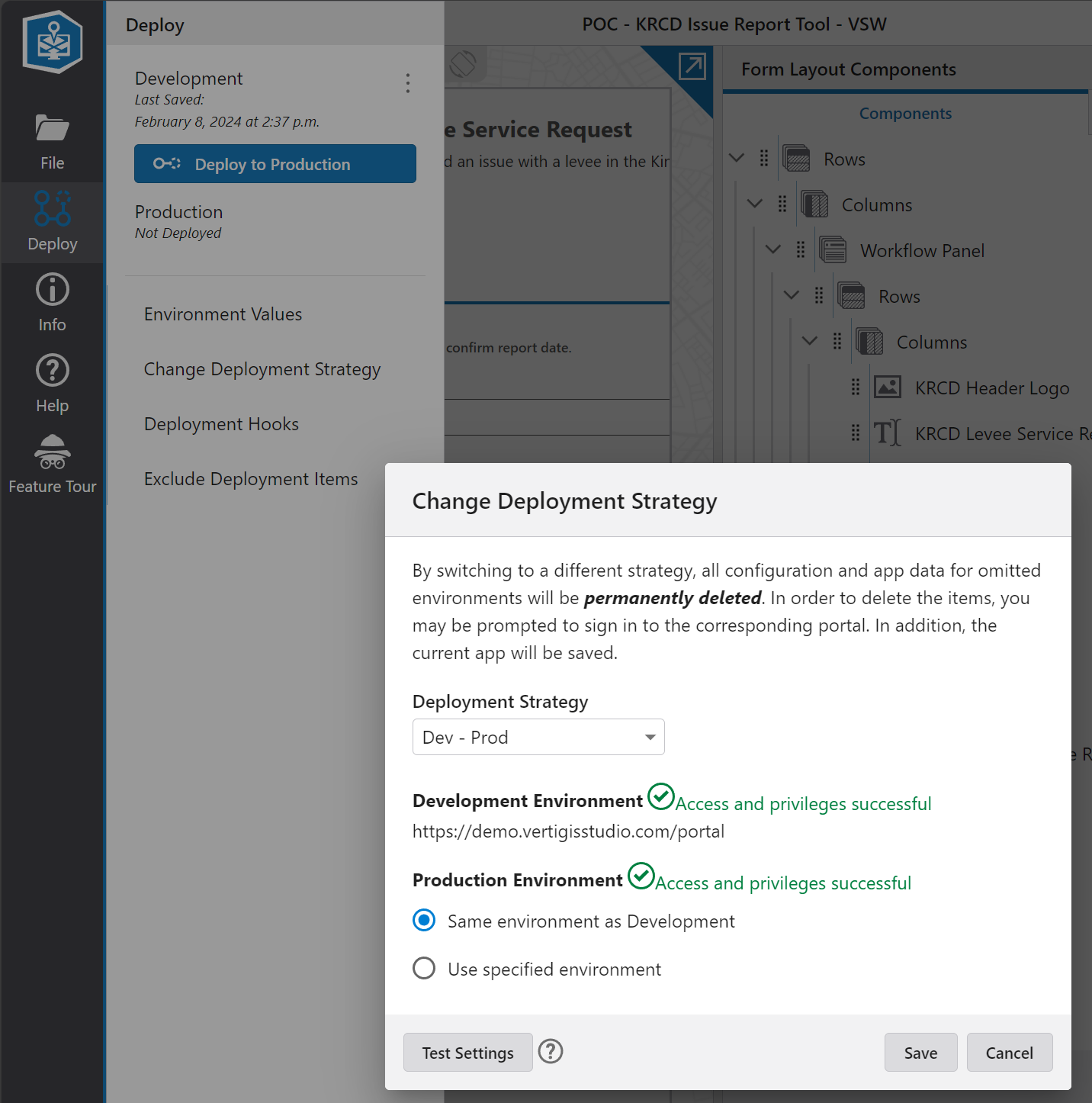
I'm wondering - is your production environment set to be the same as development environment or are you targeting your AGOL from a portal environment perhaps? I'd try that 'test settings' button in the lower left - you should get green checkmarks. If not, that would be the source of the issue.0 -
The other thing here, if the previous approach gives you no luck, is you should check the app item with client-id Y8toYGSYlEcwqWmM in your org. It's hard to do this with Esri's built-in search in AGOL, though you can craft a request using the developer API. Better yet, Item Manager allows you to search by client ID, like this:

Note I get no results - because there is no item with that client ID in my organization.
Whereas if I search for a client ID that I know exists, I get results - in this case for an item I just created to test with:
So, if that client ID doesn't exist that tells us it was either removed or unshared with you and you may need to recreate the app item registered for designer or perhaps just update permissions.0 -
Oh ok, I see. Thanks for clarifying, Gareth. We are deploying to the same environment - AGOL to AGOL.
 0
0 -
Hm, weird. What do you see in Sharing Permissions?
0 -
Sharing Permissions looks fine to me...what I would expect.
The Y8toYGSYlEcwqWmM ID# is not found by ItemManager, so I guess that is a problem. Yet, it is the VS Reporting App ID that is stated in the Reporting Post Installation settings from the server it is installed on, and it is the same Client ID that is stated in the AGOL item for the VS Reporting install. So it would seem to me that that ID# is supposed to be known and identifiable to all VS programs, but it is not being seen by the deployment process.
0 -
Ah, that is a clue. One thing there, do you use the same client ID for all of your Studio designers? If not, I'd suggest re-registering them to use the same one. This means that the Oauth session we get from AGOL/AGE can persist across designers, rather than having to get a new token. I think that there may be an issue here around not handling multiple different tokens properly but I'm not certain.
Like so: https://docs.vertigisstudio.com/reporting/latest/help/Default.htm#rpt5/help/installation-guide.htm#register-using-existing-item0 -
So I was wrong about using different Client IDs for the Studio designers - a single Client ID is used for all. It has been awhile since they were first setup.
0 -
Hey Lee Brannon so you had a consistent client ID for both Studio Web & Reporting? Hm, so not that... I'm out of from-the-hip suggestions. If you're still stuck on this, I'd suggest bringing this to the attention of our capable VertiGIS Studio Support team to dig further.
0 -
Thanks for your help, Gareth! Yes, I figured I was inching closer to help ticket submittal time. But there is one last detail that I am confused about which stems from your most recent reply. My configuration does have consistent client IDs for on-prem VS Reporting and Workflows, but as I am using VS Web in SaaS only, it does not have a client ID that I am aware of. Maybe here is where I am missing a vital ingredient?
0 -
Ahh good point. I’m inferring you’re using VSW SaaS signed in via AGOL, correct? Or is it a subdomain signing in with a portal?
And are your on prem deployments signing in with AGOL?
0 -
Yes, AGOL sign in for both the on-prem and the SaaS components.
0 -
Hey Lee
I see you've submitted a support ticket - thanks for doing that.
I'm uncertain if the use case of SaaS VSW (AGOL auth) consuming on-prem VSR/VSWF (AGOL auth) is actually a supported one so I've reached out internally to our Product team to confirm. I haven't yet heard clarification back. I've shared that discussion with our Support team on the ticket so they can benefit as well once we have more guidance from our Product team.
0 -
Gareth,
Thanks for sharing our Community discussion with the Support team - that should help get them up to speed on what we've been doing on the issue so far.
I'll post again here when the Support team and I have concluded our efforts on this case.
0 -
Solved! The solution was simple, yet it definitely didn't occur to me and I must have missed it in the documentation. I just needed to add the https://apps.vertigisstudio.com URL to the list of valid redirects in the Settings tab of the registered app item for VertiGIS Studio Reporting in AGOL.
2
Bitte melden Sie sich an, um einen Kommentar zu hinterlassen.
Kommentare
18 Kommentare