Custom URL via IIS

Hi!
We want to offer a custom URL to our customers for a VertiGIS Studio Web app. For example:
- Original URL: https://subdomain.domain.com/vertigisstudio/web/?app=b29e1272d2ac4beeb12e59ba0a94a366
- Custom URL: https://subdomain.domain.com/test/
Via IIS we can use HTTP Redirect module to launch the app via the custom URL. But after the redirect, you will see the original URL, which is not ideal.
Is it possible in IIS to hide the original URL and always show the custom URL? That would be very nice!
-

Hi Sander Broekaert this app item style URL, which is based on Esri's data model, has been a pain point for me as well.
As you found - a redirect helps but it still results in an ugly URL. What you can do is is use a rewrite rather than a redirect, which occurs server-side using a reverse proxy like IIS' URL Rewrite module. For example, you can create friendly URLs using a template. Here's an example from Microsoft docs: https://learn.microsoft.com/en-us/iis/extensions/url-rewrite-module/user-friendly-url-rule-template
2 -
Hi Gareth,
Thanks for your quick response!
We already tried with the URL Rewrite module in IIS, but we didn't get it working properly. Is it possible to provide us a sample code for the web.config file?
0 -
Hi Sander Broekaert I don't have immediate access to IIS with Application Request Routing at the moment. In our own demo environment, we use NGINX as our reverse proxy to protect our environment because it is more lightweight, faster, and has a more straightforward configuration process.
I know this is a common scenario and I imagine others will wind up here, so I did some quick research (googling). I did find this helpful Stack Overflow with some helpful syntax examples: https://stackoverflow.com/questions/4410067/iis-url-rewrite-and-web-config
So, from there, I believe the web.config sample should look like the below. Note this is not tested so your mileage may vary. Note you'd also need IIS Application Request Routing installed, as it isn't bundled with IIS.<?xml version="1.0" encoding="UTF-8"?>
<configuration>
<system.webServer>
<rewrite>
<rules>
<rule name="Rewrite to friendly URL" stopProcessing="true">
<match url="^test/$" />
<action type="Rewrite" url="vertigisstudio/web/?app=b29e1272d2ac4beeb12e59ba0a94a366" redirectType="Permanent" />
</rule>
</rules>
</rewrite>
</system.webServer>
</configuration>0 -
Thanks for the response Gareth!
I don't get it working with the sample code for now. Maybe I'll try again later
0 -
Glad to help, Sander. I'd have a look a the URL matching, that is typically the most difficult part of getting IIS ARR to work properly. The syntax used there is ECMAScript, which is somewhat hard to interpret and there's not many great examples on the internet. Whereas NGINX uses regular expressions (regex) and that's a lot more widely used (though it also can be difficult)
0 -

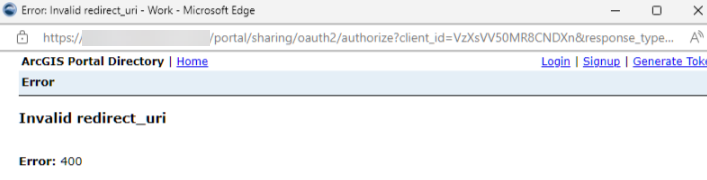
Interesting solution @.... I'm having the same issue, but because the app is secure, it gets caught in the never never land between VSW and Portal and we get an invalid redirect_uri error after the initial authentication (see below). Any ideas how to deal with authentication with this shorter URL? We're trying to configure our F5/BigIP proxy to handle this redirect and doesn't seem to like this at all. Thanks!
 0
0 -
Steve Schunzel that looks like an error from the ArcGIS portal saying the item you are trying to auth with does not have the redirect URL you are asking for in its list of redirect URIs.
I would try adding your origin where you are signing in from as a redirect URL on that app item in question in portal. e.g. if you are using the domain https://www.stevesmaps.com/ on your F5 and are signing in via an app at that URL, the portal item you are signing in to should have https://www.stevesmaps.com/ in the list of redirect URIs.
See esri docs, step 5 here: https://enterprise.arcgis.com/en/portal/11.1/use/add-app-url.htm#REG_APP
For each redirect URI, provide the address in the format ["https://<server>[:port]"] and click Add.
Redirect URIs are valid addresses that users of the app can be redirected to after they successfully sign in.
0 -
Thanks @... - Do I add the redirects to the VSW portal item or do I create a new app that refers to https://www.stevesmaps.com (which points DNS to the VSW app) and add the redirect urls there?
The URIs get me a little crazy with VSW and ArcGIS Enterprise and I'm not sure how it fires off. We've shared the app URLs with users (https://our.vswserver.com/vertigisstudio/web/?app={item ID}), which refers back to the portal for authentication. Is the app configuration contained in the portal app ID (https://our.portal.com/portal/home/item.html?id={item ID}?
I guess I should clarify that we really want the same as what the original poster wants - to shorten the URL of the VSW app, so that https://stevesmaps.com points the user to https://our.vswserver.com/vertigisstudio/web/?app={item ID} or is that not possible?
0 -
Hi Steve Schunzel I hear you on the "a little crazy" aspect.
For that specific redirect_uri error issue, you will want to have that https://our.vswserver.com/ URL as a redirect URI on the portal item.
Though, to your point around the friendly URL https://www.stevesmaps.com/ being your end goal, you will want that URI present as it is a redirect location.
Though I should point out that a DNS record will not suffice there, as that would amount to a redirect so the user would go to the stevesmaps.com URL and the redirect would send them to that our.vswserver.com . What you need, and I may be wrong here, is a rewrite rule that sits at https://www.stevesmaps.com and rewrites content from https://our.vswserver.com/vertigisstudio/web/?app={item ID}
The fact that you have an F5 BIG-IP is great, they are an awesome tool for this type of use case though I am by no means an F5 expert. This documentation around an iRule for redirect seems like the right direction, though I would recommend, if you have access, consulting with either a technical colleague with F5 experience or F5 support directly.
0 -

Hi Sander, have you found a solution?
0 -
Yes, you can contact me via sander.broekaert@siggis.be ;)
0 -
Hi Sander, thank you for responding to my question. I sent you an email.
0
Bitte melden Sie sich an, um einen Kommentar zu hinterlassen.
Kommentare
12 Kommentare