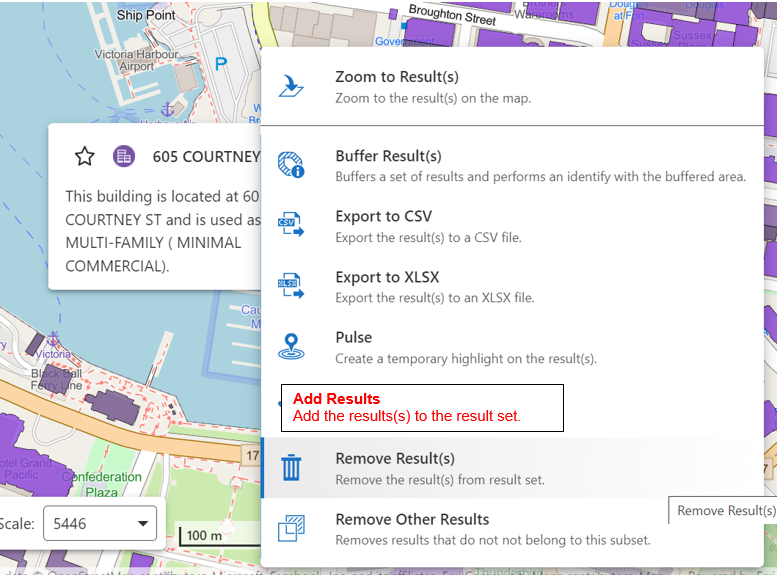
"Add Results" Feature Action command

The results.add command will add features to an existing results set. This command will not work if there are no existing features in a results list/table.
The results.display command will clear any existing results and display a new results set.
There is currently no command (that I'm aware of) that will add a feature to a results set when there are no other results, without first clearing the existing results. This means that you cannot add a Feature Action that will add the selected feature(s) to the results set without creating problems such as unintentionally removing the existing results.
In short, it would be nice to have a command that works like the opposite of results.remove that can be added to any Feature Action menu.
-

Sounds to me like we should create a results set if it does not exist when calling the existing results.add command.
0 -

I agree that this would be very useful!! It is a great issue that there is no easy way to add data to an existing result set. We have as a workaround recommended to our user to use starred in order to top-up results if they figures out they needed an additional feature. However, this is not a great solution and is a great hurdle in the users work.
A specific and important use case is that our customers in municipalities uses a custom developed tool for planning. One way of running this is with parcels as inputs from the results list. They sometimes selects say 25 parcels which might not be adjacent, but if they have missed one in the initial multipoint selection, they have to do the selection from the beginning again.
I have tried adding a command chain with the results.add and then said it should be hidden when disabled. However, it does not hide when there is not an active selection. Thus, it seems like it can make a selection but nothing is displayed as there is no results in the list.
We have customers migrating from Esri Web App Builder and I must admit, that trying to explain why this is not standard functionality is difficult.
So i agree with Matthew that a command which can add extra results without overwriting the existing but also work without any results in the list is crucial.
0 -

Hey there, I was also looking into this, and in case you haven't found it yet:
“results.activate-display-components” seems to do the trick:
["results.activate-display-components",
"results.add"
]
I wanted to share in case anyone else is (still) looking for this.
0 -

There is another forum post that might have the solution you are looking for: https://support.vertigis.com/hc/en-us/community/posts/20433587058578/comments/34166791351058
0 -
Thanks. And yes, I ended up using that solution (two extra buttons which add and remove results from current set). I works fine and the users have gotten used to it.
Even though I would have liked to have a button that worked even though there were not results in the set already
0
Bitte melden Sie sich an, um einen Kommentar zu hinterlassen.
Kommentare
5 Kommentare