Workflow container inside panel not showing

Hi,
I have a workflow container inside an initially hidden panel, configured with a permanent workflow. The first time I activate the panel the worklow appear as expected, but when I deactivate and reactivate the panel the workflow is gone.
Is this intended behaviour? For comparison, a layer list inside the same panel shows up every time the panel is activated.
I can get around it by setting a command to activate the workflow container itself, but this 1) restarts the workflow and 2) is not convenient if the panel contains several workflow containers.
-

Hey Emil
This sounds a bit like unexpected (buggy) behaviour though more detail would help. Are you on the current VSW 5.27 release? Also, do you see any errors in the console?
0 -
We're currently on version 5.26.2. A warning shows up in the console when activating the panel for the second time:
 0
0 -
Hm, that seems like it could be a red herring - or at least not the specific issue. You might need to set the Console to Verbose to get a helpful error message, like this:
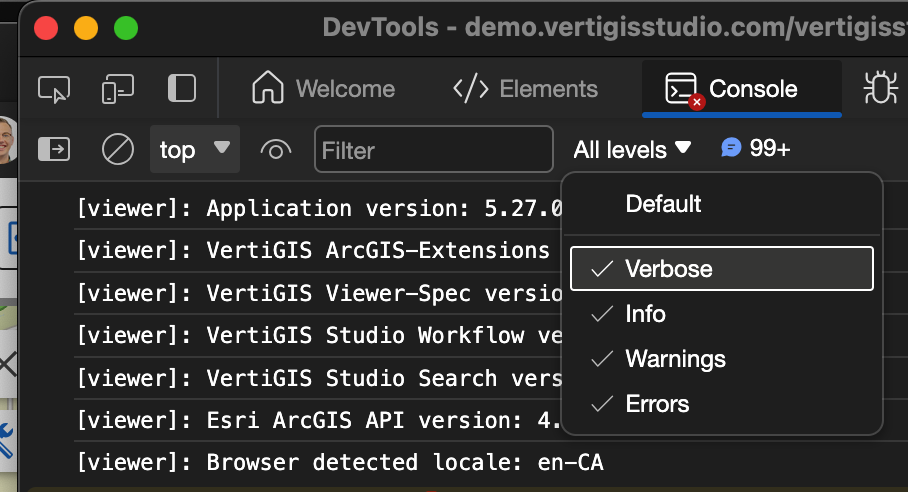
Though that error may be a clue - I'd suggest trying this with a workflow that has a simple button or as basic as possible. That should rule out whether this is an issue with the specific workflow, or perhaps a product bug that affects all workflow panels.0 -
Verbose is on, there's no error message.
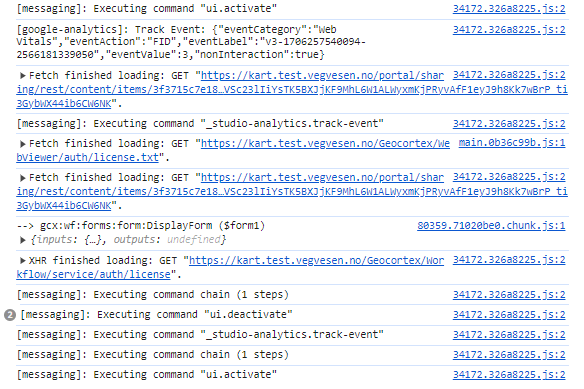
I made a basic app containing only a panel with a permanent workflow and a button to activate/deactivate it. The result is the same, the workflow doesn't show up after deactivating and then reactivating the panel. This is the console log from the first to the second activation of the panel:
 0
0 -

Did you get this working eventualy? I see the same behaviour in the latest web release.
0 -
No, but we found a way around it. Instead of deactivating the panel we minimize it and use CSS to hide it completely.
0 -
Hi VertiGIS Studio Support, did you look more into this behaviour? A permanent workflow within a panel or dialogue still disappears when the component it belongs to is closed and then reopened. The only way to keep it active seems to be to reactivate the workflow component specifically. Is this intended?
0
Bitte melden Sie sich an, um einen Kommentar zu hinterlassen.
Kommentare
7 Kommentare