Scale Input component configuration

My Scale Input component currently contains a list of arbitrary (I think) scale values. Is there a way to make configurations to this component?

-

Those aren't arbitrary scales - those are the standard Web Mercator scales used by ESRI (ArcGIS Online) and others. Sorry I can't help with how to customize them though
5 -

At the moment the only way to change those values is to switch which basemap your webmap uses, to one that has a different tiling scheme. I believe all the default Esri basemaps use the same tiling scheme from your screenshot.
But there is an Idea post over here that you could add a vote to: https://support.vertigis.com/hc/en-us/community/posts/11497546730386-Allow-configure-scale-input-to-overwrite-default-from-base-map
1 -

We have issues with this even though we have a different basemap, than Esri's default.
Should it adjust the tiling scheme automatically to the web map or is there, something we are missing?
We have tried with both a vector tile layer and a WMTS
 0
0 -

Hi Olivia Bang Brinck
Did you find an explanation in regard to the fixed scales?
We experience the same scales in the scale input component, even though we use our own map service combined with a WMTS as basemap.
0 -
Hi Lea.
No unfortunately not. But I have also not looked further into it.
Any comments on this from VertiGIS?
0 -
Martin Lauenborg could you comment on this?
0 -

We have added a tool to the map, located in the lower right corner, suggesting that the user enter the preferred scale they would like to view the map in.
 0
0 -
We have also planned to include that kind of tool in our WebGIS solution. We do not like how the scale input tool works.
However this does not solve the problem described above. Anne don't you agree with that?
0 -

I'll just add to this thread in the hope there's a simple answer to this. I too are getting some interesting results in the Scale Input.
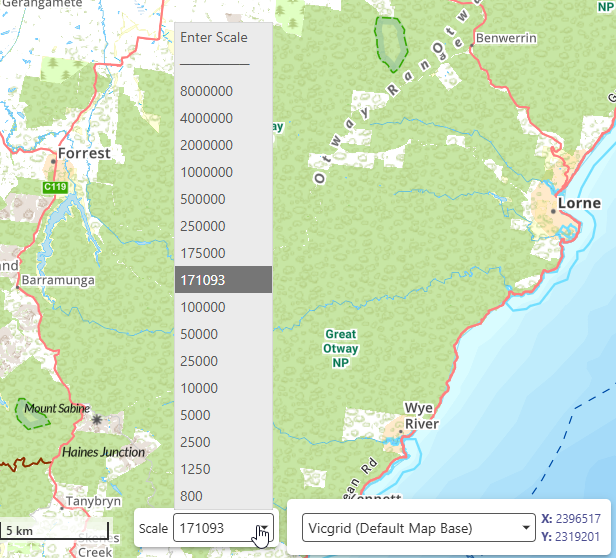
I've set up my webmap to use a specific image tile cache as the basemap, so I'd be hoping the scales from this service come through to the application. They do, to a point. On load I get a ‘random’ scale of 553942, which is NOT one of the basemap cache scales. I can see my list of cache scales in the drop down, but I also get this random one. I zoom in some more and another random scale is used and 1. this is added to the list, and 2. the map is not zooming to the basemap scales as defined in the tile cache service!
Is it me, am I missing something simple here folks? I'm kinda thinking the first random scale is the scale at which the webmap default map is saved for initial view? and has nothing to do with set scales you need to use? And every zoom in out from there on in (unless specifically chosen from the true list) is a derivative of this initial random view? I'm confused here. This was so simple in HTML viewer in Essentials. The cache map set the scale schema and that was it.
Any help or tips appreciated.
NOTE: this is NOT a web mercator scale schema.
 0
0 -
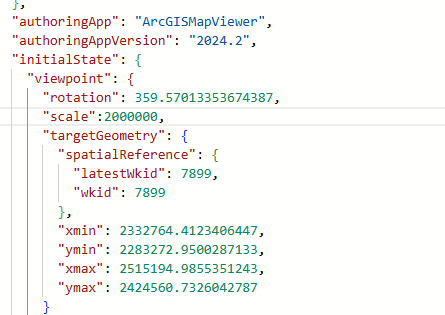
Just further to this. I've tweaked the json config of the webmap based on the Viewpoint properties listed in the esri developers api. I've added a dedicated scale option. This seems to be being respected by the webmap itself on reload in Map Viewer but not VertiGIS Web? I'm still getting a random initial scale
 0
0 -
Gareth Finney In Web Designer, try going to the Map component, scrolling down to the “Constraints” section near the bottom of the panel, and toggling “Snap to Zoom” on. I'm not 100% sure it will fix the initial scale on load, but it should definitely make the scroll-wheel zoom stick to your basemap's scales.
*note: there is a bug in Web 5.39 where the zoom animation is jittery when “Snap to Zoom” is enabled. Other versions (5.38 and older, or 5.40) do not have this issue.
0 -
Thanks Amanda Frech - that did the trick! I'm running 5.39 and seeing a slight pan and rejig/recalibration to centre on the initial mouse location, if that's what you're referring to? But I can update at some stage.
0 -
Gareth Finney Yes, that's exactly what the 5.39 bug does - with each zoom it pans a tiny bit, and the direction depends on your cursor location. People have described it as “jerky” or “not smooth”. See https://support.vertigis.com/hc/en-us/community/posts/31957812718866-Issue-with-a-map-zoom-after-the-VertiGIS-Web-5-39-0-upgrade
5.40 has a fix so that the zoom animation is about the same whether “Snap to Zoom” is on or off.
0
Bitte melden Sie sich an, um einen Kommentar zu hinterlassen.
Kommentare
13 Kommentare