How to resolve " Layer Initialization Failed" issue ?

Hey everyone
If we change the layers in web map, we would get the layer initialization failed error in GIS application which currently I understand there is couple of solution for that:
- remove map and add again which by that way we lose all layer configuration
- Make the layer failure in silent which is not good way in our case
- Download app.json and find and delete the layer data manually which is time consuming.
My first question is what is the purpose of Refresh in map setting as it doesn't resolve layer initialize failure issue.
the second question, is there any other way to resolve the layer failure issue?
-

We also are getting "layer initialization failed' error. It happens randomly, for different layers, so it's hard to replicate the issue. I set my layers to ‘silent failure’, hoping that will make the error go away, but that doesn't seem to help.
0 -

Any update regarding this?
1 -
Its still happening for us. I just opened one of our sites, and got the long list of ‘initialization failed’. And I know that our GIS services, and stable and healthy.
 0
0 -

What version of VertiGIS Web do you have deployed? VertiGIS Web version 5.28.0 initiated this bug for my organization, but the current version (5.32.0) appears to resolve it.
0 -
We are at 5.32 and still getting the issue.
Anne Stine are there any settings you had to configure in the viewer for it to stop happening?
0 -
Nataliya Lys unfortunately not. Our bug initiation was tied very specifically to versions 5.28 and 5.29. Testing later versions did not demonstrate the same behavior.
0 -
Interesting.
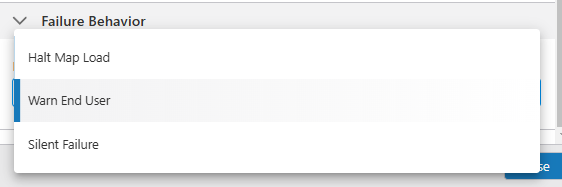
Out of curiosity, how do you have your ‘Failure Behavior’ configured for all layers? Do you have it set to default, which is ‘Warn End User’, or do you have it set to ‘Silent Failure’. Some of our user reported that with ‘Silent Failure’ the 'initialization failed' warning doesn't happened as often, but it still happens. So I wonder how much that setting matters?
 0
0 -
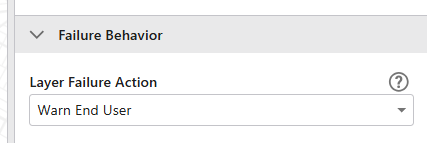
We have it set to “Warn End User”.
 0
0 -

Are you all seeing this on the Web Viewer Designer or the deployed app?
In my case, I was trying to access Standalone ArcGIS Servers that were using Windows Auth but with Anonymous access disabled in IIS, so I am not 100% this is tied to the same issue or not. However, this issue was only on the designer side which limited my ability to configure layers and all of the layers worked fine in the app once deployed.
The solution was to add a trustedServers to the App JSON. I did this with the Item Manager App that VertiGIS provides.CAUTION: Updating the app json is tricky so please make a copy of it before testing this out.
I put the “trustedServers” under the "privacyPolicyInfo" like below."privacyPolicyInfo": "item://privacy/1e0d7521-8e12-4891-bjhb-15846a0f3b63", "trustedServers": [ "https://serverA.com/", "https://serverB.com/" ], "$type": "vertigis-web" },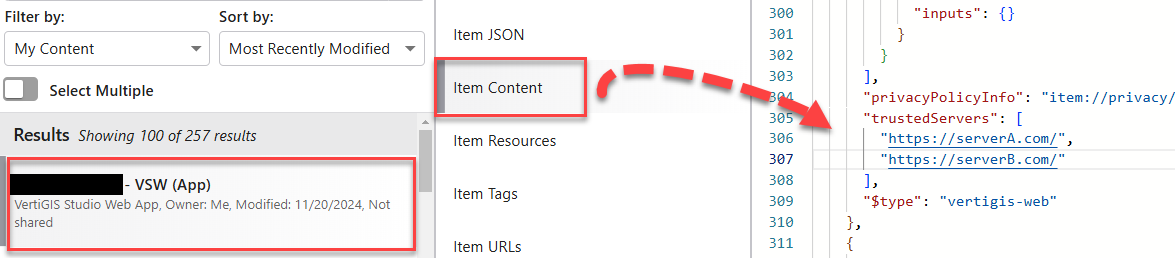
Hope this helps.
Nelson1 -

Started encountering this issue as well for us in the past week or so. It appears to be affecting users with different browser versions differently. Currently getting the response in the deployed app view.
- Currently using VertiGIS Studio Web ver. 5.33.
- I receive no layer initialization errors in Edge Version 131.0.2903.99 (Official build) (64-bit)
- However, I always receive layer initialization errors on all layers in Chrome Version 131.0.6778.140 (Official Build) (64-bit)
1 -

We are probably encountering the same issue. Did you solve it Henry?
1 -
I believe I solved it for my deployment (ArcGIS Enterprise standalone installs) but I can't be sure if this solution will work for you.
The root issue for me was that I had the map services I wanted to use for VertiGIS added to our Portal Web Map using the full server's name. Even though the server had a certificate that was valid, the services themselves were still throwing an insecure message when I accessed them directly (and they did load correctly, independently through the Server REST API.

So, I re-added all the map services to the web map being consumed by VertiGIS using a Web Adaptor that I had configured for our hosting server, instead of the direct server's name.
So, the reference URL for the map services on the portal web map went from:
“https://srv-servername/arcgis/rest/services/MapServiceName/MapServer”
to:
“https://domainname/WebAdaptorName/rest/services/MapServiceName/MapServer”That seems to have stopped the issues for our users, and layers are initializing correctly and there's no security message since the Map Service is going through the Web Adaptor machine with the valid certificate. You may have already configured your applications and Map Services in this way, so again I can't say if it will fix your issue - but this resolved it for me.
1 -

vertigis made an article for it:
Configuring Your VertiGIS Studio Web Apps to Accept Integrated Windows Authentication (IWA) – VertiGIS Support0 -

Hi VertiGIS Studio Support,
has a definite cause for this issue been found yet? Our customer has just experienced it, and their solution was to remove the map and add it again. This isn't an ideal solution and we would like to hear what the actual cause of the problem is.
Our customer is at ArcGIS Enterprise 11.3 and VGS version 5.37.0
0 -

Hi Georgina Scholes,
Thank you for your question!
This behaviour could be caused by a few different underlying issues, so if you're seeing it persistently pop up, it would be best to create a support ticket so we can work with you to troubleshoot the problem.
As a side note, re-saving the app will often clear or update configuration that's out of sync with the web map, so it's possible that simply saving the app and reloading the page will prevent the error from appearing. That's the best first step to take, followed by a support ticket if the error doesn't go away.
1 -
Hi Alisa Lindley
Thank you for your reply. I have passed it on to our customer and we have agreed to contact VertiGIS support if this issue occurs again. They have only experienced it this one time, so hopefully it will not recur.
Georgina
0 -
Hi
We are now experiencing this issue at multiple other customers again.
The layers, which are shown in the "Layer Initialization Failed" message change from each time the app is initialized. All the layers are actually initialized and working, thus indicating that this error is false.
Some of the customers are in their everyday using a workaround to just accept the errors and moving on. Therefore, they would catch any actual issues with layer initialization.We will try adding a new support ticket for one of the customers. But I wanted to flag this and underline, that I hope that this error with “false”-Layer Initialization Failed should be adresses more generally and not for each of the customers experiencing the same
0
Bitte melden Sie sich an, um einen Kommentar zu hinterlassen.
Kommentare
17 Kommentare