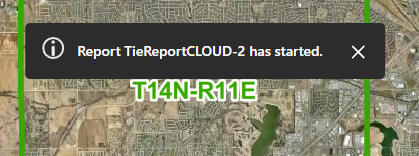
'Report started' message

Is there a way to customize this message?
-

There might be a couple ways to do this, but here's one I found today:
In Web Designer (with your app open), click File > Download Translations. Open the file in a text editor like Notepad, and add a key for "language-reports-message-started" with your desired value like this:
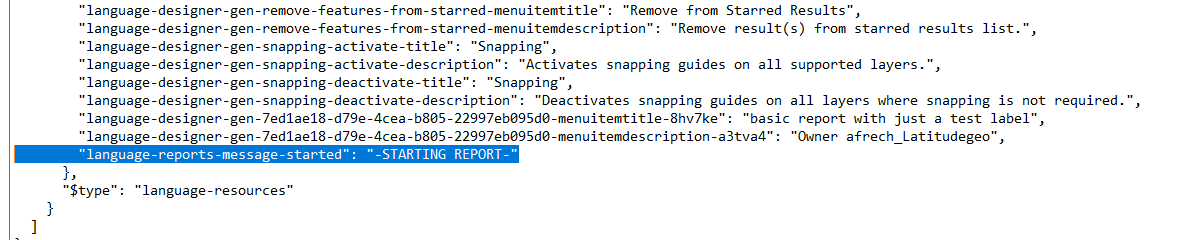
Save the changes, and in Web Designer, use File > Upload Translations to send the changes back to your app.
For reference, here's the full list of reporting-specific built-in language keys along with their default values:
    "language-reports-message-access-denied": "You do not have access to report \"{0}\".",
    "language-reports-message-download": "Report {0}{1} is complete. [Click to download.]({2})",
    "language-reports-message-failed": "Report {0}{1} has failed.",
    "language-reports-message-started": "Report {0}{1} has started.",
    "language-reports-message-still-running": "Report {0}{1} is still running.",
1 -
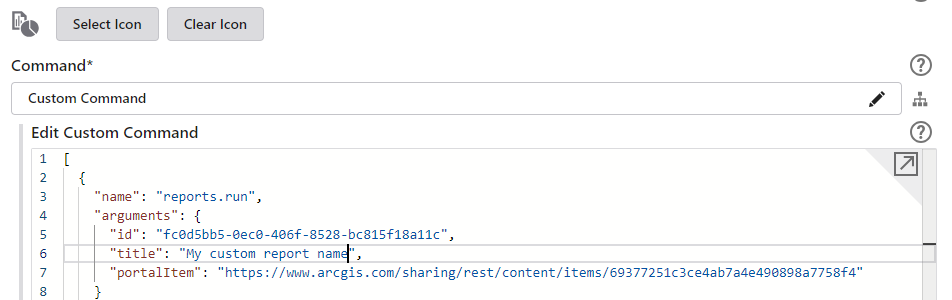
I'll also add that this change applies to the whole app. If you want to change just the "TieReportCLOUD" part, that seems to be determined by the report template's name at the time that it was added to the app. You can change it by going to the place where the report is configured in your app, clicking the "Customize" button next to the command, and changing the "title" value in the JSON.
 1
1 -
oh, yeah! Thanks Amanda!!!
1
Bitte melden Sie sich an, um einen Kommentar zu hinterlassen.
Kommentare
3 Kommentare