Way to Maximize & Minimize Panel Layout Programatically

Dearl All,
The ability to programmatically maximize & minimize panel layouts will be so handy when it comes to having the VGS Web application to be used on smart phones. We can eliminate the need to ask users to manually maximize & minimize panels.
For example, if the user click on "Edit Location", the VGS Workflow should be able to run command to minimize the panel for better user experience on the VGS Web application.

Thanks a lot,
Reno
-
Offizieller Kommentar

[
    {
        "name": "ui.set-visual-state",
        "arguments": {
            "visualState": "maximized",
            "id": "panel-82e5d094"
        }
    }
]
[
{
"name": "ui.set-visual-state",
"arguments": {
"visualState": "minimized",
"id": "panel-82e5d094"
}
}
]... where your id matches your particular panel. -

I think this is what the ui.set-visual-state command is for, but I haven't used it much and I vaguely recall struggling with it.
0 -
Wow Zack Robison and Cam Barnard,
Thanks a lot for your answer to my questions! I will test it out soon :)
0 -

Some tips for the ui.set-visual-state command:
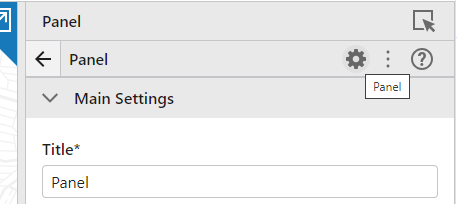
--In Web Designer, you can use the gear icon in the panel component configuration to find its ID:
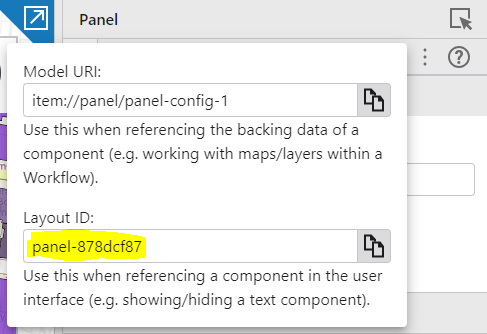
--The options for visualState seem to be "minimized", "maximized", "normal", and "detached"
2 -

does it only works with panels? or also with toolbars?
For example to minimalize this one..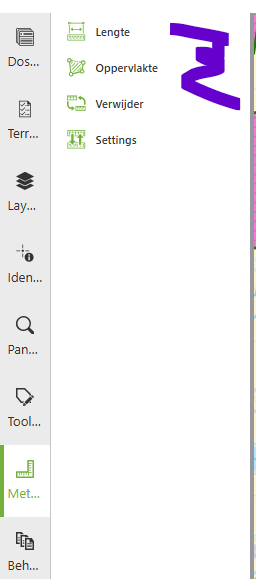 0
0
Bitte melden Sie sich an, um einen Kommentar zu hinterlassen.
Kommentare
5 Kommentare