Configure Related Table fields

I have been looking at the feature editing in html5 viewer (new version - 2.3). It looks very promising. I am using a service that has a single feature class and 2 related tables, where 1-to-many relationships are possible. I can get all of the related records to display, and edit them. What I am hoping to do is configure what fields in the related table display, and maybe have control over hiding some fields in those tables that we don't want anyone to edit.
For example, for a feature that has 3 related records, it is difficult to find and keep track of which of those 3 records you are editing, since in many cases the default display field may have the same value. This example shows that the 'name' field is displaying for all related table records, so differentiating between them is quite difficult.
/customer/servlet/servlet.FileDownload?file=00P6000000em1m0EAA
-
To add some newer info, it looks like whatever field you set as the display name (for your related tables) in your mxd carries over here, which is somewhat helpful. However html5 viewer really does not like expressions, for example if you combine 2 fields in the display in ArcMap, it works fine there, but is not displayed in either the service service on the rest services page, or in the viewer itself.
Also if you made a field 'read only' in the mxd (like a primary or foreign key) it is totally hidden in the editing interface in html5 viewer, and does not populate, so if you add a new record it doesn't have what it needs to related back to the feature class. Bummer.
0 -
Hi Allen,
Have you figured out a solution or workaround for the issues you were having with displaying related records? I'm facing similar issues and not having a lot of luck getting it to work as I want it to.0 -

Have you tried using Expanded View? 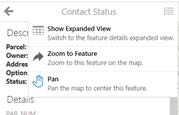 0
0
Bitte melden Sie sich an, um einen Kommentar zu hinterlassen.
Kommentare
3 Kommentare